How to Improve Posture Desk Without a Standing Desk
Many people assume that improving posture requires a major workspace upgrade—often starting with the purchase of a standing desk. While standing desks can be beneficial, they are not the only—or even the primary—solution to better posture.
Posture is not determined by the equipment you own, but by how well your body is supported over time. Proper alignment, stability, and pressure distribution have a far greater impact than simply switching between sitting and standing positions.
For individuals who spend extended hours at a desk, it is common to experience slouching, stiffness, or discomfort in the back, neck, and shoulders. Most people develop poor desk posture due to prolonged sitting, making this a widespread issue. These issues often develop gradually, as small postural habits repeat over time.
Poor posture can lead to various health problems, including musculoskeletal issues like back, neck, and shoulder pain, especially when small postural habits repeat over time.
The good news is that meaningful improvements do not require a complete overhaul of your workspace. With a clearer understanding of how posture works—and a few targeted adjustments—you can significantly improve the way you sit using your existing setup.
When applied consistently, even small changes can reduce strain, enhance comfort, and support better posture throughout the workday.

Why Your Posture Gets Worse When You Sit (Even If You Try to Sit Straight)
If you’ve ever made a conscious effort to “sit up straight,” only to find yourself slouching again shortly after, you are not alone. This is a common experience—and it is not a matter of discipline or awareness.
In most cases, it is a mechanical issue.
When the body is seated without adequate support, it naturally shifts into positions that require less muscular effort to maintain. Over time, this creates a predictable chain reaction throughout the body:
- The pelvis tilts backward, moving out of a neutral position
- The lower spine loses its natural inward curve
- The upper back rounds forward
- The head shifts forward to maintain visual alignment with the screen
This sequence disrupts the body’s natural alignment and places increasing strain on muscles and joints. The longer you remain in this position, the more pronounced these effects become—especially during extended periods of desk work.
One of the key challenges with posture is that maintaining an upright position without support relies heavily on continuous engagement of the back muscles. While this may be sustainable for short periods, it quickly leads to fatigue. As the back muscles tire, the body gradually returns to a more relaxed—but less aligned—position.
This is why posture tends to deteriorate over time, even when you are actively trying to correct it.
Understanding this dynamic is essential. It highlights that poor posture is not simply a habit to “fix,” but a result of how the body responds to unsupported sitting conditions.

How Poor Sitting Posture Leads to Back, Neck, and Shoulder Pain
Poor posture is often thought of as a visual issue—but its impact is far more significant. It directly influences how your body distributes weight, manages pressure, and maintains alignment throughout the day.
When sitting posture begins to break down, the body compensates in ways that place additional strain on key areas:
- The lower back absorbs increased pressure, especially when the natural lumbar curve is unsupported. This can lead to stiffness, fatigue, and persistent discomfort, and back pain.
- The neck shifts forward to align with your screen, placing extra load on the cervical spine and surrounding muscles. Over time, this contributes to tightness and reduced mobility, and neck pain.
- The shoulders round forward, creating tension across the upper back and contributing to a feeling of heaviness or fatigue.
Prolonged poor posture can also increase the risk of injury to the back, neck, and shoulders.
Individually, these changes may seem minor. However, when maintained for hours each day, they create cumulative stress on the body.
Common Symptoms of Poor Desk Posture
| Area Affected | Common Symptoms |
|---|---|
| Lower Back |
Dull ache, stiffness after prolonged sitting |
| Neck |
Tightness, soreness, reduced range of motion |
| Shoulders | Tension, fatigue, rounded posture |
Even slight misalignment—when sustained over long periods—can result in noticeable discomfort after a long day by the end of the workday. What often begins as mild tension can gradually develop into more persistent issues if the underlying posture is not addressed.
Understanding this connection between posture and discomfort is an important step. It shifts the focus from simply managing symptoms to improving the conditions that contribute to them.

You Don’t Need a Standing Desk to Fix Your Posture
Standing desks are often presented as the ideal solution for improving posture. While they can be a useful addition to a workspace, they are not a requirement—and they do not automatically resolve underlying posture issues.
What matters more is how your body is positioned and supported throughout the day.
Effective posture is built on three key elements:
- Spinal alignment – maintaining the natural curves of the spine
- Pelvic positioning – keeping the pelvis in a stable, neutral position
- Proper support while sitting – reducing unnecessary strain on muscles
These factors can be addressed without changing your desk setup.
In many cases, posture-related discomfort develops not from sitting itself, but from how you sit over extended periods. A poorly supported sitting position can place more strain on the body than standing with improper alignment.
The encouraging takeaway is that meaningful improvements do not require a complete workspace overhaul. Small, intentional adjustments—such as how you position your hips, support your lower back, or align your screen—can significantly improve posture and minimize strain or discomfort.
When combined with the right support, these changes help create a more stable and sustainable sitting position.
It is helpful to think of posture not as a single solution or product, but as a system—one that depends on how different elements of your workspace and body alignment work together.

7 Simple Ways to Improve Your Posture While Sitting
If you’re looking for practical ways to improve posture at your desk, the most effective approach is to focus on small, consistent adjustments. Rather than forcing your body into a rigid position, the goal is to create a setup that supports natural alignment. It’s important to frequently check and adjust your posture throughout the day to ensure you’re maintaining good habits and preventing discomfort.
The following strategies address the key elements of proper sitting posture—helping reduce strain while making your position easier to maintain throughout the day.
1. Start With Your Hips, Not Your Shoulders
Posture begins at the base of your body—not the upper back.
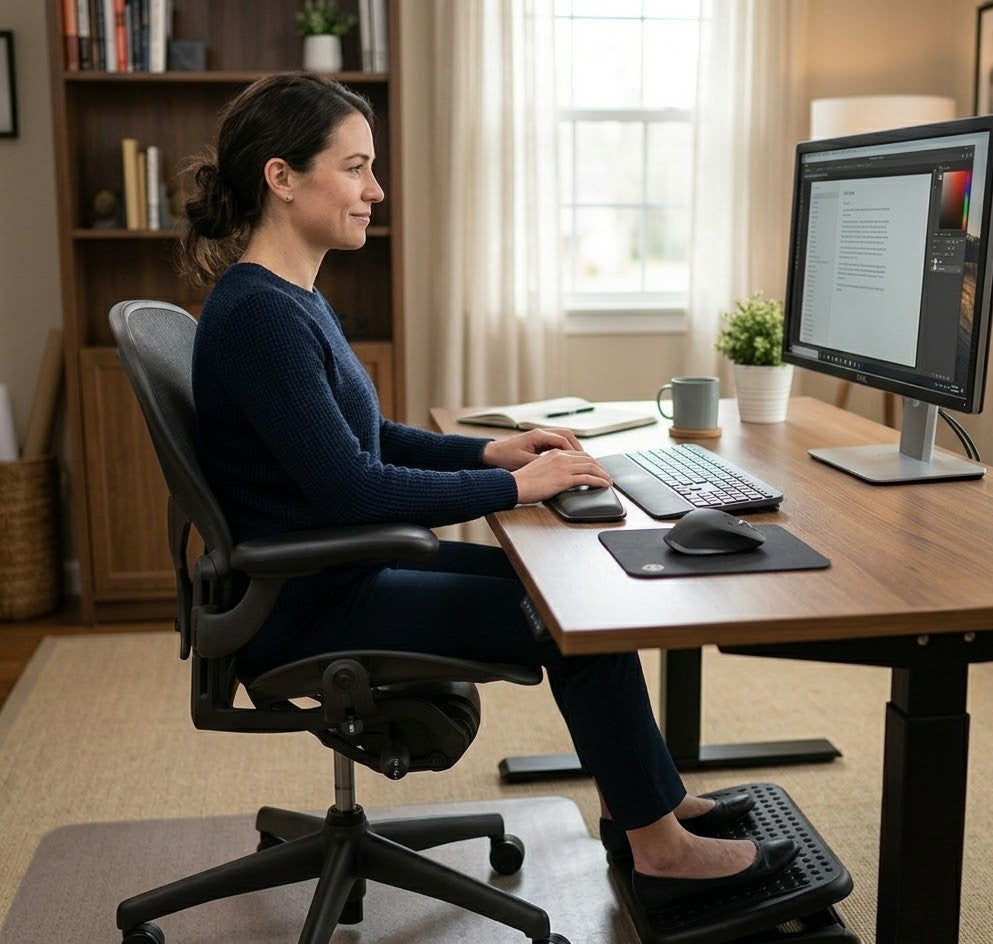
Sit all the way back in your chair so your hips are fully supported. From there, position your pelvis in a neutral alignment, avoiding a backward tilt that can flatten the lower spine.
When the pelvis is stable, the rest of the spine can align more naturally.
2. Support Your Lower Back
The lumbar spine has a natural inward curve that plays a critical role in maintaining proper posture.
Without adequate support, this curve tends to collapse, placing additional stress on surrounding muscles and structures. Providing support at the lower back helps preserve this alignment and reduces the effort required to sit upright.
3. Keep Your Feet Flat and Stable
Your feet serve as the foundation of your seated posture.
Make sure there is adequate space for your legs under the desk to allow for comfortable movement and proper support.
They should rest flat on the floor, with your knees positioned at or slightly below hip level. This promotes balance and helps prevent unnecessary shifting in the pelvis, which can affect spinal alignment.
4. Align Your Screen to Eye Level
Screen position has a direct impact on head and neck posture.
If your computer screen is positioned too low, your head will naturally move forward to compensate. Over time, this creates strain on the neck and upper back. Adjust your screen so that your gaze falls naturally near the top third of the display. For optimal viewing and comfort, position your computer screen about an arm's length away.
5. Keep Your Shoulders Relaxed
Proper posture does not mean holding your shoulders in a rigid, pulled-back position. It's important to keep your arms relaxed, with your upper arms close to your body, to reduce strain and promote comfort during desk work.
Instead, allow your shoulders to rest comfortably in a neutral alignment. Tension in the shoulders often develops when posture is forced rather than supported, leading to fatigue over time. Keep your elbows at a comfortable angle and close to your sides to further minimize strain while sitting and typing.
6. Avoid Sliding Forward in Your Chair
Sliding forward may feel more relaxed initially, but it disrupts the alignment of your pelvis and spine.
This position often leads to a rounded lower back and increased pressure on the lumbar region. Sitting fully back in your chair helps maintain consistent support and alignment.
7. Take Micro Breaks to Reset Your Posture
Even with optimal posture, remaining in a single position for extended periods can lead to fatigue. To improve posture at your desk, make it a habit to stand up regularly during breaks, aiming to take a break at least every half hour.
Incorporating short breaks every 30 to 60 minutes allows your muscles to reset and reduces the buildup of strain. Simple movements such as standing, stretching, or briefly walking can make a meaningful difference over the course of the day.
When applied consistently, these adjustments can significantly improve how you sit. More importantly, they help create a posture that is not only aligned—but also sustainable for long periods of desk work.

Why Good Posture Is Hard to Maintain Without Support
One important aspect of posture is often overlooked:
Maintaining good posture requires continuous effort—unless the body is properly supported.
Many people are able to sit upright briefly, but find it difficult to sustain that position over time. This is because, in the absence of support, posture relies heavily on muscular engagement.
When posture depends solely on muscle strength:
-
The muscles fatigue over time
-
The spine gradually loses alignment
-
The body defaults back to a slouched position, often without conscious awareness
This cycle is not a reflection of poor habits or lack of discipline. It is a natural response to prolonged effort.
A key factor contributing to this issue is the design of most standard chairs. Many do not provide adequate:
- Lumbar support, leaving the lower spine unsupported
- Even pressure distribution, which affects how weight is balanced while sitting
- Pelvic stability, making it difficult to maintain a neutral seated position
Without these elements, the body must compensate—leading to increased strain and reduced endurance over time.
This is why maintaining proper posture can feel challenging, even when you understand the correct positioning. The issue is not simply knowing what to do, but having the necessary support to sustain it comfortably. Proper support helps protect your joints and overall comfort during long periods of sitting.

How Ergonomic Support Makes Good Posture Easier (Not Forced)
Rather than relying on continuous muscle effort to maintain alignment, ergonomic support allows the body to remain in a more natural and sustainable position.
When the right areas of the body are properly supported, posture becomes less about conscious correction and more about structural ease. This reduces fatigue and helps maintain alignment over longer periods of sitting.
Consulting a physical therapist can provide personalized guidance on ergonomic strategies and exercises to improve posture at your desk.
Two key areas play a particularly important role in this process:
1. Lumbar Support for Spinal Alignment
The lower back, or lumbar spine, has a natural inward curve that is essential for proper posture. When this curve is unsupported, the spine tends to collapse, leading to increased strain on surrounding muscles.
A well-designed lumbar support helps maintain this natural curvature by providing consistent support where it is needed most.
The Serenform Atlas Lumbar Pillow is designed to:
-
Support the natural curve of the lower spine
-
Reduce strain associated with prolonged sitting
-
Encourage a more neutral and stable seated position
By reinforcing proper alignment at the lumbar level, it reduces the need to actively “hold” posture, allowing the spine to remain supported with less effort.
2. Seat Cushion for Pressure Distribution and Pelvic Positioning
While back support is essential, the role of the seat itself is often underestimated.
The way weight is distributed while sitting directly affects pelvic positioning—and in turn, spinal alignment. Uneven pressure or insufficient cushioning can lead to subtle shifts in posture that accumulate over time.
The Serenform Summit Seat Cushion is designed to:
-
Promote more even weight distribution
-
Support a stable pelvic position
-
Reduce pressure on the lower back, hips, and sitting bones
By improving how the body interacts with the chair, it helps create a more balanced and supportive seating foundation.
When combined, lumbar support and seat cushioning address both alignment and pressure—two of the most critical factors in maintaining proper posture.
The result is a sitting experience that feels more stable, requires less effort, and places less strain on the body over time.
Ultimately, good posture becomes easier to maintain when it is supported by your environment, rather than sustained through constant correction.

Small Changes That Make Long Hours at Your Desk More Comfortable
Improving posture is not solely about achieving proper alignment—it is about creating a position that can be maintained comfortably throughout the day.
Sitting for extended periods places continuous demands on the body. Without the right support, even well-intentioned posture adjustments can become difficult to sustain. Over time, this leads to fatigue, frequent repositioning, and gradual discomfort. Consider padding or softening the edge of your desk to prevent discomfort or pressure on your arms and wrists during long hours of work.
When your body is properly supported, several important changes occur:
-
Less energy is required to maintain an upright position, reducing reliance on constant muscle engagement
-
Strain on the spine and surrounding muscles is minimized, allowing for more consistent comfort
-
Fatigue accumulates more slowly, helping you feel less physically drained by the end of the day
These improvements may seem subtle at first, but their impact becomes more noticeable over time. Small adjustments—such as refining your sitting position or improving how your body is supported—can significantly enhance your overall work experience.
Rather than continuously correcting your posture or shifting to relieve discomfort, your workspace begins to function in a way that supports your body more effectively.
The result is a sitting experience that feels more stable, more comfortable, and better suited for long hours of focused work.

Conclusion: Better Posture Starts With Better Support—Not a New Desk
Improving posture at your desk does not require a complete transformation of your workspace. While equipment can play a role, the most meaningful changes come from understanding how posture functions and how your body interacts with your environment over time.
At its core, better posture is built on three key principles:
- Understanding how alignment works, including the relationship between the pelvis, spine, and head
- Making small, intentional adjustments to how you sit throughout the day
- Providing support where your body needs it most, so alignment can be maintained with less effort
Posture is not simply a habit that can be corrected through awareness alone. It is the result of how your body is positioned, supported, and sustained over long periods of sitting.
When these factors are addressed, the benefits become noticeable. Reduced strain, improved comfort, and greater consistency in how you sit all contribute to a more sustainable work experience—especially during extended hours at a desk.
Importantly, these improvements do not require drastic changes. In many cases, the most effective solutions are also the simplest. Small adjustments, when applied consistently, can create a meaningful shift in how your body feels throughout the day.