10 Ergonomic Hacks to Boost Productivity at Home
Working from home offers flexibility and convenience, but it often comes with hidden challenges. As the workday progresses, it’s common to experience fatigue, physical discomfort, and a noticeable decline in focus. Without proper routines and boundaries, working remotely can also impact mental health and increase stress, making it harder to maintain a healthy balance between work and personal life.
Productivity is not solely a function of discipline or time management. It is also heavily influenced by how well your body is supported throughout the day. When your workspace lacks proper ergonomic support, the effects can accumulate quickly and may negatively affect both your physical comfort and mental health:
- Muscles are forced to work harder to maintain posture
- The spine gradually falls out of alignment
- Energy is depleted more rapidly than expected
Over time, these small inefficiencies can significantly impact both comfort and performance.
The encouraging part is that improving your workspace does not require a complete redesign or expensive equipment. In many cases, targeted adjustments can lead to meaningful improvements. Ergonomic hacks can also help you better balance work and personal life by reducing stress and supporting overall well-being.
By applying a few practical ergonomic strategies, it’s possible to reduce physical strain, support proper posture, and maintain focus more consistently—using the setup you already have. This article will provide actionable tips to help you address these challenges and create a healthier, more productive remote work environment.
SECTION 1: Energy & Fatigue
1. Fix Your Sitting Position to Reduce Energy Drain
If you find yourself feeling fatigued just a few hours into your workday, your sitting position may be a key contributing factor.
Posture plays a critical role in how efficiently your body functions while seated. When your alignment is off, your muscles are required to continuously compensate to keep you upright. This increased muscular effort may not be immediately noticeable, but over time it leads to accumulated fatigue, reduced comfort, and diminished focus.
In contrast, a well-aligned sitting position allows your body to rely more on skeletal support rather than muscular effort. This reduces unnecessary strain and helps preserve energy throughout the day.
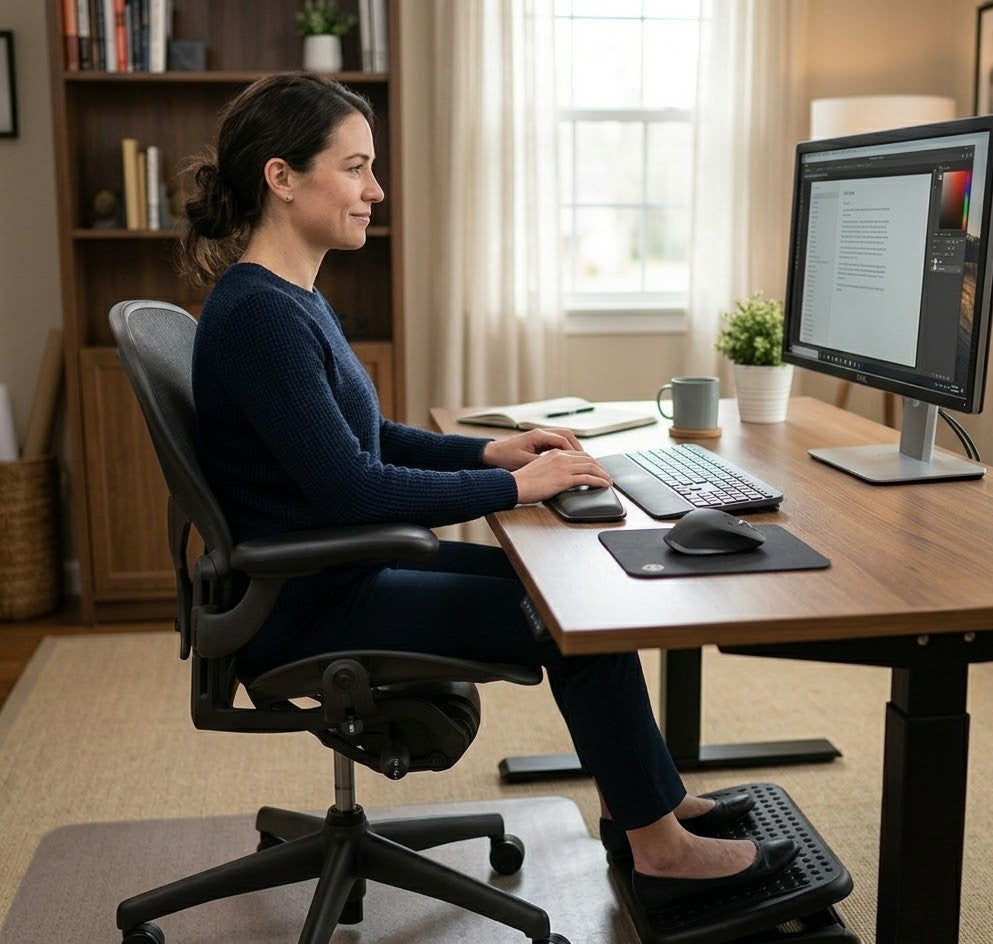
To improve your sitting posture:
- Sit with your hips positioned fully at the back of your chair to support the natural curve of your spine
- Keep your feet flat on the floor or on a stable support to maintain proper lower body alignment
- Ensure your ears are aligned over your shoulders to avoid forward head posture
These adjustments create a neutral sitting position that promotes balance and stability. When your body is properly supported, it requires less effort to maintain posture—allowing you to stay focused, comfortable, and productive for longer periods.

2. Support Your Lower Back to Prevent Midday Fatigue
Lower back support is one of the most important—yet often overlooked—factors in maintaining comfort and energy throughout the workday.
Without adequate lumbar support, the natural curve of the lower spine is not properly maintained. As a result, the pelvis tilts backward and the spine begins to collapse into a slouched position. This shifts the burden from structural support to the surrounding muscles, forcing them to work continuously to stabilize your posture.
Over time, this increased muscular effort contributes to:
- Early onset of fatigue
- Lower back discomfort
- Reduced ability to sit comfortably for extended periods
Introducing proper lumbar support helps restore the spine’s natural alignment and reduces unnecessary strain on the body. With the right support in place:
- The spine remains in a more neutral position
- Muscles can relax rather than compensate
- Sitting becomes more sustainable over longer durations
Even a simple adjustment—such as adding a well-designed cushion or support—can significantly improve how your body feels throughout the day. Small improvements in support often lead to noticeable gains in both comfort and productivity.

3. Adjust Your Screen Height to Avoid Mental Fatigue
Screen positioning plays a critical role not only in physical comfort, but also in maintaining consistent mental focus throughout the day. Keeping your eye line clear and at the same level as your computer screen helps reduce discomfort and distractions, supporting better focus.
When your screen is positioned too low, your body naturally compensates by tilting the head forward and downward. This seemingly minor adjustment places sustained strain on the neck and upper back muscles, which must remain engaged to support the head. Over time, this contributes not only to physical discomfort, but also to a gradual decline in concentration. Increased screen time with a poorly positioned computer screen can also lead to eye strain.
A poorly positioned screen can lead to:
- Forward head posture and increased neck strain
- Continuous muscle engagement in the upper body
- Reduced visual comfort and decreased focus
These physical inefficiencies often translate into cognitive fatigue, making it more difficult to stay engaged in your work.
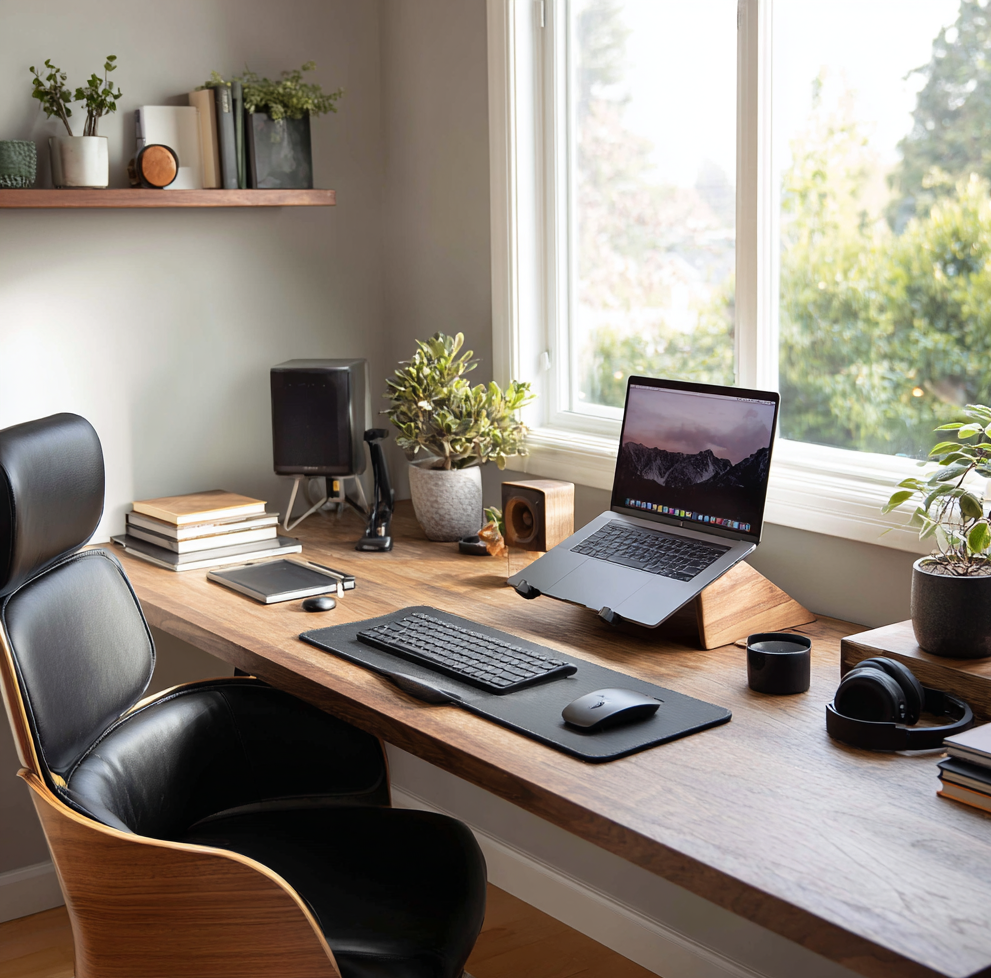
The solution is straightforward: position your screen at eye level. Adjusting your computer screen to the correct eye line can help prevent eye strain and reduce the negative effects of prolonged screen time. This allows your head and neck to remain in a neutral position, reducing strain and supporting more natural posture.
Using a tool such as the Serenform Elevate Laptop Stand can help raise your screen to an optimal height, creating a more ergonomic viewing angle. By improving alignment, this simple adjustment can enhance both comfort and sustained attention during long work sessions.

SECTION 2: Pain & Posture Correction
4. Keep Your Head Stacked Over Your Spine
One of the most common posture-related issues in a home office setup is forward head posture. While it may seem subtle, this misalignment places a significant amount of strain on the neck and upper back over time.
The head is relatively heavy, and its position directly affects how much work the surrounding muscles must do. As the head moves forward beyond the shoulders, the load on the cervical spine increases considerably. This added strain forces the neck and upper back muscles to remain constantly engaged, often leading to discomfort, stiffness, and fatigue.
Over prolonged periods, this can contribute to:
- Persistent neck and shoulder pain
- Increased tension in the upper back
- Reduced comfort during extended work sessions
Maintaining proper alignment helps minimize this strain and supports a more sustainable sitting posture.
To correct and maintain proper head positioning:
- Keep your ears aligned vertically over your shoulders
- Avoid leaning your head toward your screen while working
- Bring your screen closer or adjust its position rather than moving your body forward
These adjustments help keep the head balanced over the spine, reducing unnecessary muscular effort. When alignment improves, the neck and shoulders are able to relax, resulting in greater comfort and improved focus throughout the day.

5. Improve Seat Pressure Distribution
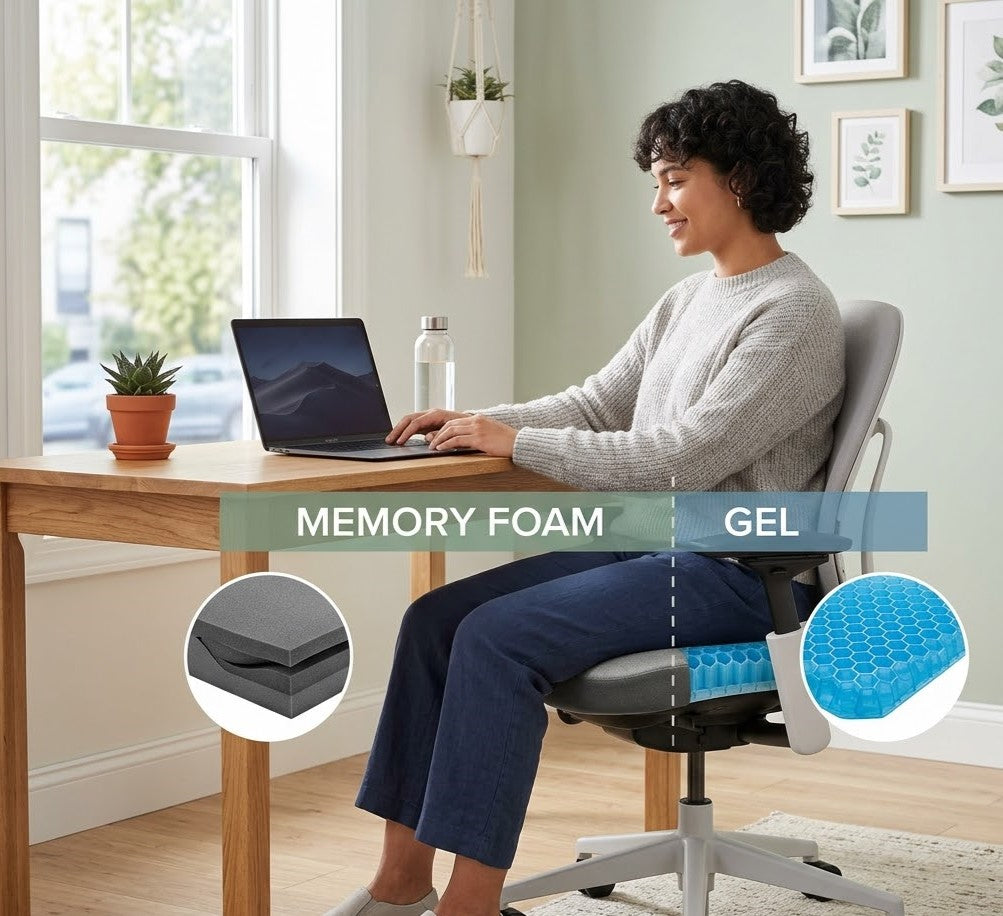
Sitting for extended periods places continuous pressure on the hips and thighs. When that pressure is not evenly distributed, discomfort gradually builds—often without immediate awareness.
Uneven pressure can lead to:
- Frequent shifting and repositioning
- Reduced ability to stay focused
- Faster onset of physical fatigue
These small adjustments and interruptions may seem minor, but over time they can significantly affect both comfort and productivity.
Proper seat support helps distribute weight more evenly across the sitting surface. This reduces localized pressure points and allows the body to remain stable without constant adjustment.
With improved pressure distribution:
- Sitting becomes more comfortable and sustainable
- Movement caused by discomfort is minimized
- Focus can be maintained for longer periods
Despite its impact, this is one of the most commonly overlooked aspects of an ergonomic workspace. Addressing how your weight is supported while seated can make a meaningful difference in how you feel throughout the workday.

6. Stop Crossing Your Legs While Sitting
Crossing your legs while seated may feel natural or comfortable in the moment, but over time it can create imbalances in the way your body is supported.
When one leg is placed over the other, it shifts the position of the pelvis and disrupts the alignment of the spine. This uneven positioning can lead to compensations throughout the body, particularly in the lower back and hips.
Over prolonged periods, this habit may contribute to:
- Poor overall posture
- Increased strain on the lower back
- Uneven weight distribution across the hips
These imbalances often go unnoticed at first, but they can gradually affect comfort and stability during long work sessions.
A more supportive sitting position involves:
- Keeping both feet flat on the floor or on a stable surface
- Aligning your knees at or slightly below hip level
- Maintaining even weight distribution across both sides of the body
For individuals whose feet do not comfortably reach the floor, incorporating a footrest can help maintain proper alignment. A product such as the Serenform Axis Footrest provides consistent support for the feet, promoting balanced posture and reducing unnecessary strain during extended periods of sitting.
By keeping the lower body properly supported, you create a more stable foundation for the spine—making it easier to maintain good posture and stay comfortable throughout the day.

SECTION 3: Simple Setup Upgrades
7. Upgrade Your Chair Without Replacing It
Improving your workspace does not necessarily require investing in a new ergonomic chair. In many cases, meaningful improvements can be achieved by enhancing the support your current chair provides.
Standard office chairs—or makeshift seating used at home—often lack the specific features needed to properly support the body during long periods of sitting. However, targeted adjustments can significantly improve both comfort and posture.
Simple upgrades to consider include:
- Adding lumbar support to maintain the natural curve of the lower back
- Improving seat cushioning to promote better pressure distribution
- Adjusting your sitting height so your feet remain flat and your knees are properly aligned
These changes help create a more supportive seating system by addressing the key areas where discomfort typically develops.
Rather than replacing your entire setup, refining how your body interacts with your chair can lead to noticeable improvements in how you feel throughout the day. With better support in place, posture becomes easier to maintain, and prolonged sitting becomes more sustainable.

8. Create a More Ergonomic Desk Setup in Minutes
An effective workspace does not need to be complex or highly customized to support productivity. In many cases, a few well-considered adjustments can significantly improve both comfort and efficiency.
Ergonomics is fundamentally about alignment—ensuring that your body is positioned in a way that minimizes strain while allowing you to work naturally. By focusing on key elements of your setup, you can create a more supportive environment within minutes.
Use the following checklist as a guide:
| Area Affected | Common Symptoms |
|---|---|
| Lower Back |
Dull ache, stiffness after prolonged sitting |
| Neck |
Tightness, soreness, reduced range of motion |
| Shoulders | Tension, fatigue, rounded posture |
A key point to remember is that proper monitor placement is essential for ergonomic comfort and helps prevent neck and shoulder strain.
Each of these adjustments contributes to a more balanced and efficient sitting position. When your body is properly aligned:
- Muscular strain is reduced
- Posture becomes easier to maintain
- Movement caused by discomfort is minimized
These improvements, while seemingly small, can have a meaningful impact on how you feel and perform throughout the day. A well-arranged desk setup supports not only physical comfort, but also sustained focus and productivity.
The spine gradually falls out of alignmentThe spine gradually falls out of alignment
SECTION 4: Focus & Productivity Optimization
9. Reduce Physical Distractions to Improve Focus
Physical discomfort is one of the most overlooked barriers to sustained productivity. While it may seem minor in the moment, even low levels of discomfort can gradually disrupt concentration and reduce overall work efficiency.
From an ergonomic perspective, the body and mind are closely connected. When the body is under strain—whether from poor posture, inadequate support, or pressure buildup—it continuously signals for adjustment. These signals may be subtle, but they can fragment attention and make it more difficult to maintain deep focus.
Research supports this connection. A study published in Applied Ergonomics found that poorly designed workstations are associated with increased fatigue and reduced task performance, highlighting the direct impact of physical conditions on cognitive output.
When your workspace does not adequately support your body:
- Attention is frequently diverted toward physical discomfort
- Breaks become more frequent, often out of necessity rather than intention
- Work quality and efficiency may decline over time
Improving ergonomics helps reduce these physical distractions at their source. By creating a setup that supports proper alignment and minimizes strain, the body requires fewer adjustments, allowing the mind to remain engaged.
With fewer interruptions caused by discomfort, it becomes easier to maintain a consistent, focused workflow—supporting both productivity and overall work quality.

10. Use Movement Breaks to Reset Your Body and Mind
Even with an optimized ergonomic setup, remaining in a static position for extended periods can place strain on the body and gradually reduce energy levels. The human body is designed for movement, and prolonged sitting—regardless of posture—can limit circulation and contribute to both physical and mental fatigue.
Incorporating regular movement into your work routine is essential for maintaining productivity over the course of the day. Schedule time for intentional breaks, including a dedicated lunch break, to rest and recharge. Use your lunch break not only for eating lunch but also for stepping away from your desk, taking a walk, or simply spending time relaxing to support your overall well-being.
To support this:
- Stand or stretch every 30–60 minutes
- Take short walks between tasks or meetings
- Take a walk outside during a break to get fresh air and reset
- Periodically reset your posture when returning to your desk
These brief, intentional breaks help counteract the effects of prolonged sitting by:
- Promoting healthy blood circulation
- Reducing muscle stiffness and tension
- Supporting mental clarity and sustained focus
Spending time away from your desk during free time, such as lunch or scheduled breaks, allows you to rest, enjoy fresh air, and maintain a healthy work-life balance.
Over time, these small habits can make a meaningful difference in how your body feels and how effectively you work.
The Centers for Disease Control and Prevention (CDC) highlights that prolonged sitting is associated with increased fatigue and negative health outcomes, underscoring the importance of incorporating regular movement throughout the workday.
By integrating movement into your routine, you create a more balanced work pattern—one that supports both physical well-being and consistent productivity.

SECTION 5: Comfort for Long Sessions
Bonus Tip: Make Comfort Your Default, Not an Afterthought
Whether you are working or studying for extended periods, comfort is not simply a matter of preference—it is a key factor in maintaining consistent focus and performance.
When a workspace lacks adequate support, the body naturally seeks relief through constant adjustments. These small, repeated movements may seem insignificant, but they can gradually interrupt concentration and reduce overall efficiency.
An unsupportive setup often leads to:
- Frequent shifting to relieve discomfort
- Difficulty maintaining attention on tasks
- Faster onset of physical and mental fatigue
In contrast, when your body is properly supported, the experience of sitting changes significantly. With the right ergonomic conditions in place:
- Sitting requires less effort
- Physical distractions are minimized
- Focus can be sustained for longer periods
Over time, this creates a more stable and productive work rhythm.
Positioning comfort as a priority—rather than an afterthought—allows you to build a workspace that supports both your physical well-being and your ability to perform at your best. In this context, comfort is not an indulgence; it is a practical and essential component of long-term productivity.

SECTION 6: Why Ergonomics Improves Productivity
Small Changes, Big Impact
Ergonomics is not about achieving a perfect workspace—it is about minimizing unnecessary strain so your body can function more efficiently throughout the day.
Every element of your setup influences how much effort your body must exert to maintain posture and perform tasks. When that effort is higher than necessary, energy is diverted away from productive work and toward simply staying comfortable.
By improving the way your workspace supports you:
- The body relies more on proper alignment and less on muscular compensation
- Posture becomes more stable and easier to maintain
- Physical strain is reduced, allowing energy to be preserved
These changes, while often subtle, have a cumulative effect. As physical effort decreases, mental resources can be directed more fully toward focus, problem-solving, and task completion.
This is why even small ergonomic adjustments—such as improving support, adjusting screen height, or optimizing sitting position—can lead to meaningful improvements in productivity. Over time, these incremental changes create a more sustainable work environment, where comfort and performance are aligned rather than competing.
In essence, when your body is supported efficiently, your work becomes easier to sustain—and your productivity becomes more consistent as a result.
Conclusion: Productivity Starts With How You Sit
If maintaining productivity while working from home has been a challenge, the solution may not lie in increasing effort or extending work hours. More often, it begins with improving how your body is supported throughout the day.
Work performance is closely tied to physical comfort and alignment. When your setup encourages poor posture or creates unnecessary strain, fatigue accumulates more quickly, and focus becomes harder to sustain. Addressing these underlying factors can have a meaningful impact on both how you feel and how effectively you work.
By making small, intentional adjustments to your workspace:
- Physical strain is reduced
- Posture becomes easier to maintain
- Focus and consistency improve over longer periods
Importantly, these benefits do not require a complete redesign of your environment. In many cases, targeted improvements—such as better support, alignment, and positioning—are enough to create noticeable change.
When your body is properly supported, productivity is no longer something that must be forced. Instead, it becomes more natural, more sustainable, and easier to maintain throughout the workday.
We hope you absolutely love the improvements you experience from applying these ergonomic hacks and that they help you feel good every day as you work from home.