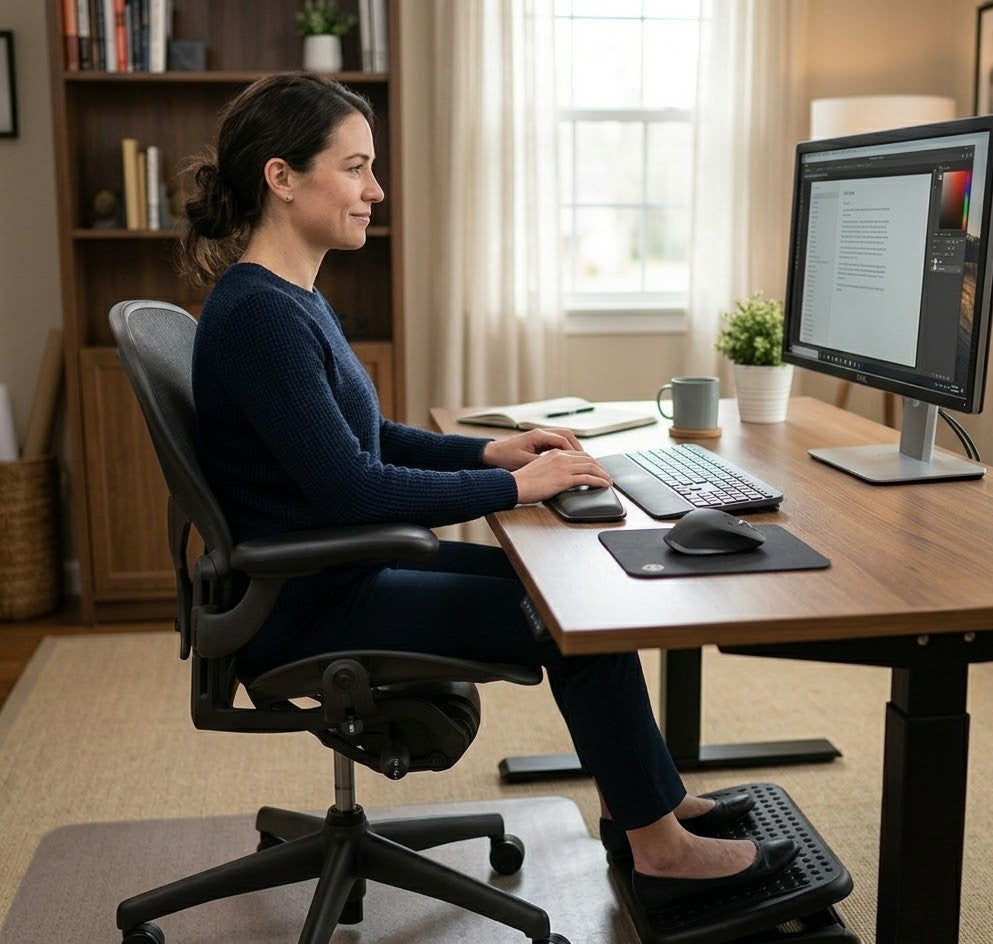
11 Common Sitting Mistakes Neck Pain Sufferers Make
If your neck feels stiff, sore, or tight after a day of sitting, you’re not alone—and more importantly, it’s not something you should ignore.
That discomfort isn’t random. It’s usually the result of small sitting habits you repeat every single day—often without realizing it. Leaning forward, looking down at your screen, or sitting without proper support may feel harmless in the moment, but over time, they place increasing strain on your neck and spine.
The problem is that these habits don’t cause immediate pain. They build gradually. What starts as occasional stiffness can turn into persistent tension, reduced mobility, and even chronic neck pain that affects how you work, sleep, and move throughout your day.
If you’ve ever wondered, “Why does my neck hurt just from sitting?”—the answer is likely in how you’re sitting right now.
In this guide, you’ll learn the most common sitting mistakes that quietly lead to neck pain—and what you can do to stop them before they turn into long-term problems.

How Sitting Mechanics Affect Your Neck
If your neck feels strained even when you’re “just sitting,” the issue often isn’t your neck alone.
The neck does not function in isolation. It is part of a coordinated system—the spine—where each segment relies on the others to maintain balance, alignment, and support. When one area of this system is compromised, another area must adapt to compensate.
In a well-supported sitting position:
- The lower back (lumbar spine) provides a stable foundation
- The upper back (thoracic spine) supports the shoulders and chest
- The neck (cervical spine) maintains the position of the head with minimal effort
When these elements are properly aligned, the body distributes load efficiently, and the muscles are not required to overwork to maintain posture. As a result, sitting feels more stable, comfortable, and sustainable—even over longer periods.
However, when sitting posture lacks proper support—especially at the hips and lower back—this balance begins to shift.
Common changes include:
- The lower back loses its natural curve (often due to insufficient support), leading to slouching
- The upper back rounds forward as the body compensates for that lack of support, affecting shoulder position
- The head shifts forward, moving out of alignment with the spine
As a result, the neck muscles are forced to work harder to stabilize and support the head. Over time, this increased demand contributes to fatigue, tension, and persistent discomfort.
This pattern is commonly referred to as forward head posture—a condition strongly associated with neck strain from poor posture. You might notice this as a feeling of your head “pulling forward” or increased tightness at the base of your neck after sitting for extended periods.
Research highlights the extent of this effect. For every inch the head moves forward from its neutral position, the effective load on the neck rises substantially—reaching up to 60 pounds of force at more extreme angles (Hansraj, Surgical Technology International, 2014). This added strain is not always immediately noticeable, but it accumulates over time. Over prolonged periods, this increased load can also contribute to wear and tear on the neck joints, potentially leading to joint discomfort and degenerative changes.
Importantly, this strain is not usually caused by a lack of effort—it is caused by a lack of support. When the body is not properly supported at its foundation, the neck is forced to compensate.
This is why sitting posture and ergonomics play a critical role in neck health. Even subtle misalignments, when repeated throughout the day, can gradually lead to persistent discomfort and chronic neck pain.
Understanding how these mechanics work is the first step toward making meaningful adjustments—because when your spine is properly supported from the base up, the strain on your neck is significantly reduced.

11 Common Sitting Mistakes That Lead to Chronic Neck Pain
1. Pushing Your Head Forward Toward the Screen
One of the most common—and often unnoticed—posture mistakes that leads to neck pain is pushing the head forward toward the screen.
If you ever find yourself leaning in to read your screen more clearly or focusing more closely on your work, you’re likely doing this without realizing it.
This typically happens when the screen is too far away, too small, or not positioned at an optimal height, prompting you to lean forward for clarity.
While this adjustment may feel natural at the moment, it gradually pulls your head out of its neutral alignment with the spine—often for long periods at a time.
Why it causes strain:
- The head is no longer balanced over the shoulders, increasing the mechanical load on the cervical spine.
- Neck and upper back muscles must work continuously to hold the head in a forward position.
- Over time, this leads to muscle fatigue, tension, and persistent discomfort.
Even a small forward shift—when repeated throughout the day—can significantly increase the stress placed on your neck.
👉 This is often one of the first patterns where strain begins to build without being immediately noticeable.
What to change:
- Position your screen at a comfortable viewing distance to avoid leaning forward
- Raise the screen so that it sits at or near eye level
- Keep your ears aligned over your shoulders rather than drifting forward
These adjustments help restore a more neutral posture and reduce unnecessary strain.
However, maintaining this position consistently throughout the day can be difficult—especially as your muscles fatigue and your focus shifts.
This is where proper support plays an important role, helping your body stay aligned without requiring constant correction.

2. Looking Down at Your Laptop for Hours
In many work-from-home and mobile setups, laptops are placed directly on the desk—often below eye level. This naturally encourages a downward gaze, causing the neck to remain in a flexed position for extended periods.
If you regularly work on a laptop without adjusting your setup, this is likely happening more often than you realize.
While this posture may feel manageable at first, maintaining it for hours places continuous strain on the cervical spine.
Why it causes strain:
- Sustained neck flexion increases tension in the muscles at the back of the neck and upper shoulders
- The head’s forward and downward position amplifies the load on the cervical spine
- Over time, this can lead to stiffness, fatigue, and persistent discomfort
This is often where discomfort begins to feel more noticeable—especially after longer work sessions.
What to change:
- Elevate your laptop using a stand, books, or a riser so the screen is closer to eye level
- Alternatively, use an external monitor positioned directly in front of you
- Aim to keep your gaze aligned with the top third of your screen
These adjustments help reduce the need to look downward and support a more neutral neck position.
However, even with an improved setup, maintaining this position consistently throughout the day can be difficult—especially as posture naturally breaks down over time.

3. Sitting Without Lower Back Support
One of the most overlooked contributors to neck pain from sitting is not the neck itself—but the lack of proper support in the lower back.
The lumbar spine plays a critical role in maintaining overall spinal alignment. When it is unsupported, the body gradually shifts into a less stable position—often without conscious awareness.
Why it causes strain:
- Without adequate lumbar support, the lower back loses its natural inward curve
- This leads to slouching, which alters the alignment of the entire spine
- As the upper back rounds forward, the head moves out of position
- The neck is then forced to compensate, increasing muscular effort and strain
In this way, poor lower back support creates a chain reaction—one that often ends in persistent neck tension and discomfort.
At this point, something important becomes clear:
Even if you correct your screen height or posture, the strain can still return if your body isn’t properly supported.
What to change:
- Maintain the natural curve of your lower back while sitting
- Sit fully back in your chair so your back is supported rather than unsupported or hovering
- Keep your knees at about a 90-degree angle, level with or slightly below your hips
These adjustments help—but they can be difficult to maintain consistently throughout the day.
Where Proper Support Makes a Difference
This is where structured ergonomic support becomes important.
A well-designed lumbar support—such as the Serenform Atlas Lumbar Pillow—helps maintain the natural curve of your lower back, reducing the tendency to slouch and preventing the chain of compensation that leads to neck strain.
At the same time, improving how your weight is distributed while sitting plays a key role. A supportive seat cushion—like the Serenform Summit Seat Cushion—helps stabilize your pelvis and reduce pressure buildup, making it easier to maintain proper alignment over longer periods.
When your foundation is properly supported, your posture becomes easier to maintain—and your neck no longer has to compensate as much throughout the day.

4. Rounding Your Shoulders Forward
Rounding the shoulders forward is a common postural pattern, especially during prolonged desk work. It often develops gradually—particularly when typing, using a mouse, or reaching toward a screen positioned too far away.
If you’ve ever caught yourself slouching deeper into your chair as the day goes on, this is likely part of the reason.
Why it causes strain:
- Rounded shoulders tighten the chest and upper trapezius while weakening the muscles that support proper posture
- This imbalance pulls the upper spine forward, disrupting alignment
- As the shoulders roll inward, the head naturally shifts forward as well
- The neck muscles must then work harder to stabilize the head, leading to fatigue and tension
Over time, this creates a build-up of strain across the shoulders and neck—often without you noticing when it starts.
What to change:
- Keep your shoulders relaxed and gently positioned back—not rigid
- Position your keyboard and mouse within easy reach to avoid reaching forward
- Adjust your desk and chair height so your arms can rest comfortably
These adjustments help restore balance to the upper body.
However, like many posture corrections, they become harder to maintain as your muscles fatigue—especially during long work sessions.

5. Letting Your Screen Sit Too Low
Screen height plays a major role in how your neck positions itself throughout the day.
When your screen is too low, your gaze naturally shifts downward—causing your neck to follow.
While this may feel comfortable initially, maintaining this position for extended periods creates ongoing strain.
Why it causes strain:
- A low screen encourages prolonged neck flexion, increasing tension along the back of the neck
- Over time, this contributes to stiffness, fatigue, and persistent discomfort
- It also reinforces other poor posture habits, such as slouching and forward head positioning
Because this habit is subtle, it often continues throughout the day without being corrected.
What to change:
- Raise your screen so it sits at or slightly below eye level
- Use a monitor riser, laptop stand, or books to adjust height
- Keep the screen directly in front of you
This helps maintain a more neutral head position and reduces unnecessary strain.

6. Sitting Too Far From or Too Close to Your Desk
Your distance from your desk might seem like a small detail—but it has a direct impact on your posture.
When your positioning is off, your body compensates—often in ways that increase strain on your neck and shoulders.
Why it causes strain:
- Sitting too far away encourages you to lean forward, pulling your head and shoulders out of alignment
- Sitting too close creates a compressed posture, limiting natural movement
- Both positions disrupt neutral alignment, causing your neck and upper body to compensate
These small positioning issues can quietly build into ongoing discomfort over time.
What to change:
- Position yourself so your elbows rest comfortably at about a 90-degree angle
- Sit close enough to avoid reaching forward, while maintaining a relaxed posture
- Keep your keyboard and mouse within easy reach
These adjustments help reduce unnecessary strain and improve overall alignment.
Why These Sitting Habits Keep Coming Back
At this point, a pattern starts to emerge.
Most sitting mistakes aren’t caused by one single issue—they’re the result of small positioning habits that are difficult to maintain consistently throughout the day.
Even when you correct them, your body naturally drifts back as fatigue sets in.
That’s why many people experience the same cycle:
- Adjust posture
- Feel better temporarily
- Then notice the discomfort return
The missing piece is often not awareness—but support.
👉 Fix the Root Cause of Your Neck Strain

7. Perching on the Edge of Your Chair
Sitting on the edge of your chair may feel more active or engaged, but it significantly reduces the support your body relies on for proper alignment.
Without contact with the backrest, your body is left to stabilize itself—often without you realizing how much effort that requires.
Why it causes strain:
- Without back support, the spine lacks stability and begins to collapse into a slouched position
- The pelvis may tilt backward, disrupting the natural curvature of the lower back
- As alignment breaks down, the neck and shoulders compensate to keep the head upright
- This increased muscular effort leads to fatigue, tension, and ongoing discomfort
Over time, this creates a pattern where your body is constantly working to maintain posture instead of being supported by it.
What to change:
- Sit fully back in your chair, allowing the backrest to support your spine
- Keep your hips positioned at the back of the seat
- Focus on maintaining a stable, supported sitting position
However, this is often where people struggle.
Without proper seat stability and support, it becomes difficult to stay in this position for long—especially during extended periods of sitting.
👉 This is where having a more supportive sitting foundation makes a noticeable difference.

8. Tilting Your Head While Using One Screen or Device
Tilting your head to one side is a subtle habit that often develops when using multiple monitors, working from an off-center screen, or frequently looking at a phone placed beside your workspace.
It may not feel significant at first—but over time, it creates uneven strain on the neck.
Why it causes strain:
- One side of the neck is placed under constant tension
- This leads to muscular imbalances over time
- The upper body begins to compensate, affecting shoulders and upper back
- Discomfort often becomes more noticeable on one side
Because this pattern develops gradually, it’s easy to overlook until it becomes persistent.
What to change:
- Position your primary screen directly in front of you
- Keep your most-used monitor centered
- Bring secondary devices into your line of sight instead of adjusting your head
These adjustments help restore balanced alignment across the neck and upper body.
But like many posture corrections, consistency is the challenge—especially during long work sessions.

9. Using Armrests Incorrectly (or Not at All)
Arm support is often overlooked, but it plays a direct role in how much strain your neck and shoulders experience.
When your arms aren’t properly supported, their weight is transferred upward to your shoulders—and eventually your neck.
Why it causes strain:
- Unsupported arms place continuous downward force on the shoulders
- This causes the shoulders to tense or elevate
- The neck muscles compensate to stabilize the upper body
- Over time, this leads to tightness and fatigue across the neck and upper back
Even small amounts of tension, held for hours, can build into noticeable discomfort.
What to change:
- Adjust your armrests so your arms are supported without lifting your shoulders
- Keep your elbows close to your body at about a 90-degree angle
- Ensure your shoulders remain relaxed, not elevated
Supporting your arms reduces the load placed on your shoulders—and helps your neck remain in a more relaxed position.
Why Support Matters More Than Individual Fixes
At this stage, a consistent pattern starts to emerge.
Many of these sitting mistakes are not caused by a single habit—but by how your body is supported throughout the day.
Even when you make the right adjustments, maintaining them becomes increasingly difficult over time. As your muscles fatigue and your focus shifts, your posture naturally begins to break down again.
This is why many people find that small corrections only provide temporary relief.
When your body is properly supported:
- Your posture requires less effort
- Your upper body stays more aligned
- Your neck is less likely to compensate
This is what makes the difference between short-term improvement—and lasting comfort during long periods of sitting.

10. Sitting Still for Too Long Without Resetting Posture
Even with a well-adjusted setup, staying in the same position for long periods can lead to strain.
The body isn’t designed to remain static for hours at a time. As your muscles fatigue, your posture gradually begins to break down—often without you noticing.
Why it causes strain:
- Prolonged sitting leads to fatigue in the muscles that support your spine
- As these muscles tire, your body shifts into less stable positions such as slouching
- This gradual change increases strain on the neck, shoulders, and upper back
- Over time, these patterns contribute to stiffness, discomfort, and reduced mobility
What makes this challenging is how subtle the shift can be—posture rarely collapses all at once.
What to change:
- Reset your posture every 20–30 minutes
- Sit back fully and realign your spine
- Take short breaks to stand, stretch, or move
These small adjustments help reduce fatigue and maintain better alignment throughout the day.
However, even with regular movement, returning to a poorly supported sitting position can quickly bring the same strain back.

11. Ignoring Pressure and Discomfort Signals
Your body constantly provides feedback while you sit—subtle signals like pressure, stiffness, or the urge to shift position.
These signals are often easy to ignore, especially when you’re focused on work.
But they’re usually early indicators that your body isn’t being properly supported.
Why it causes strain:
- Uneven pressure leads to frequent, unconscious adjustments
- These adjustments disrupt pelvic positioning and spinal alignment
- As your body compensates, the neck and upper back take on additional strain
- Over time, this creates a cycle of discomfort and fatigue
When pressure isn’t evenly distributed, maintaining a stable posture becomes much more difficult.
What to change:
- Pay attention to early signs of discomfort instead of pushing through them
- Adjust your sitting position when pressure begins to build
- Improve how your weight is distributed while sitting
When your body is properly supported, there is less need for constant adjustment—allowing your posture to remain more stable throughout the day.

The Impact of Opposite Direction
Spending long hours in the same position—especially with poor posture—gradually increases strain on your neck and back.
One simple way to relieve this tension is to move in the opposite direction of your usual posture.
If you notice yourself leaning forward or feeling tightness in your neck, take a moment to reset:
- Gently move your head backward
- Keep your chin level and ears aligned over your shoulders
This helps reduce pressure on the neck and restore a more neutral position.
The same principle applies throughout the day:
- Open your chest and bring your shoulders back
- Avoid letting your head drift forward
- Take short breaks to stand, stretch, or walk
These small movements help counteract the effects of prolonged sitting and reduce the build-up of tension over time.
However, while these adjustments can provide relief, their effect is often temporary if your sitting position continues to place your body under strain.
That’s why combining movement with proper support is key—so your body stays aligned even when you’re not actively correcting your posture.

Why Small Sitting Adjustments Make a Big Difference
In many cases, meaningful improvements come from small, consistent adjustments made throughout the day.
- Your muscles require less effort to maintain position
- Strain on your neck and shoulders is reduced
How Simple Adjustments Help Reduce Neck Strain
| Adjustment | Impact on the Neck |
|---|---|
| Raising your screen |
Reduces forward head posture and excessive neck flexion |
| Adding lumbar support |
Helps maintain spinal alignment and reduces compensation |
| Improving seat comfort | Stabilizes posture and reduces unnecessary shifting |
| Taking regular breaks | Prevents muscle fatigue and posture breakdown |
| Strengthening posture muscles | Supports long-term spinal stability |
Each of these adjustments addresses a specific factor that contributes to neck strain. When combined, they create a more supportive and sustainable sitting environment.
The key factor is consistency.
Small corrections made occasionally may provide temporary relief—but maintaining those improvements throughout the day is where the real benefit comes from.
This is also where many people run into difficulty.
Even with the right adjustments, posture naturally breaks down over time as muscles fatigue and attention shifts.
When your setup provides proper support, these small adjustments become much easier to maintain—allowing your body to stay aligned with less effort.
Over time, this reduces cumulative strain and supports more lasting relief from neck pain associated with prolonged sitting.
In this way, improving posture is not about perfection—it is about creating conditions that allow your body to function more comfortably and consistently throughout the day.

The Role of Proper Support in Preventing Neck Pain
When dealing with neck pain, it’s natural to focus on where the discomfort is felt.
But in many cases, the underlying issue starts elsewhere—specifically in how your body is supported while sitting.
Posture is not isolated to one area. It’s the result of how your entire body is positioned from the ground up.
Without adequate support:
- The pelvis tilts backward, disrupting the foundation of the spine
- The natural curves of the spine begin to flatten or collapse
- The upper body shifts forward, pulling the head out of alignment
This creates a chain reaction.
As alignment breaks down, the neck is forced to compensate to keep the head upright—leading to ongoing strain, muscle fatigue, and persistent discomfort.
With proper support in place:
- The pelvis remains stable in a neutral position
- The spine maintains its natural curvature
- The head stays balanced over the shoulders
In this position, the body functions more efficiently, and the neck no longer has to overwork to compensate.
Where Proper Support Makes a Difference
This is where targeted ergonomic support becomes important.
The Serenform Atlas Lumbar Pillow helps maintain the natural curve of the lower back—supporting proper spinal alignment and reducing the chain of strain that reaches the neck.
The Serenform Summit Seat Cushion improves pressure distribution and sitting stability—helping keep the pelvis supported and balanced during prolonged sitting.
Together, they support the foundation of your posture, making it easier to stay aligned without constant effort.
By improving how your body is supported at its base, overall load distribution throughout the spine becomes more balanced.
Research shows that proper lumbar support can reduce the muscular effort required to stabilize the trunk—helping decrease compensatory strain in the upper body.
As a result, the neck is less likely to compensate, supporting greater comfort during long periods of sitting.

Conclusion: Neck Pain Is Often a Pattern, Not a Problem
Chronic neck pain is rarely caused by a single issue.
More often, it develops gradually through small daily habits—subtle posture misalignments that accumulate over time.
On their own, these habits may seem insignificant. But when repeated for hours each day, they create ongoing strain on the neck and surrounding structures—leading to persistent discomfort, tension, and reduced mobility.
The key takeaway is that these patterns are not fixed.
They can be identified, adjusted, and improved.
By making small changes to how you sit—and ensuring your body is properly supported—you can:
- Reduce unnecessary strain on your neck and shoulders
- Improve overall spinal alignment
- Create a more comfortable and sustainable sitting experience
These improvements don’t require drastic changes. Consistent, small adjustments—combined with proper support—can make a meaningful difference over time.
Because posture isn’t about perfection.
It’s about creating conditions that allow your body to function with less effort and greater stability.
And when your body is properly supported,
you don’t have to constantly think about maintaining good posture.