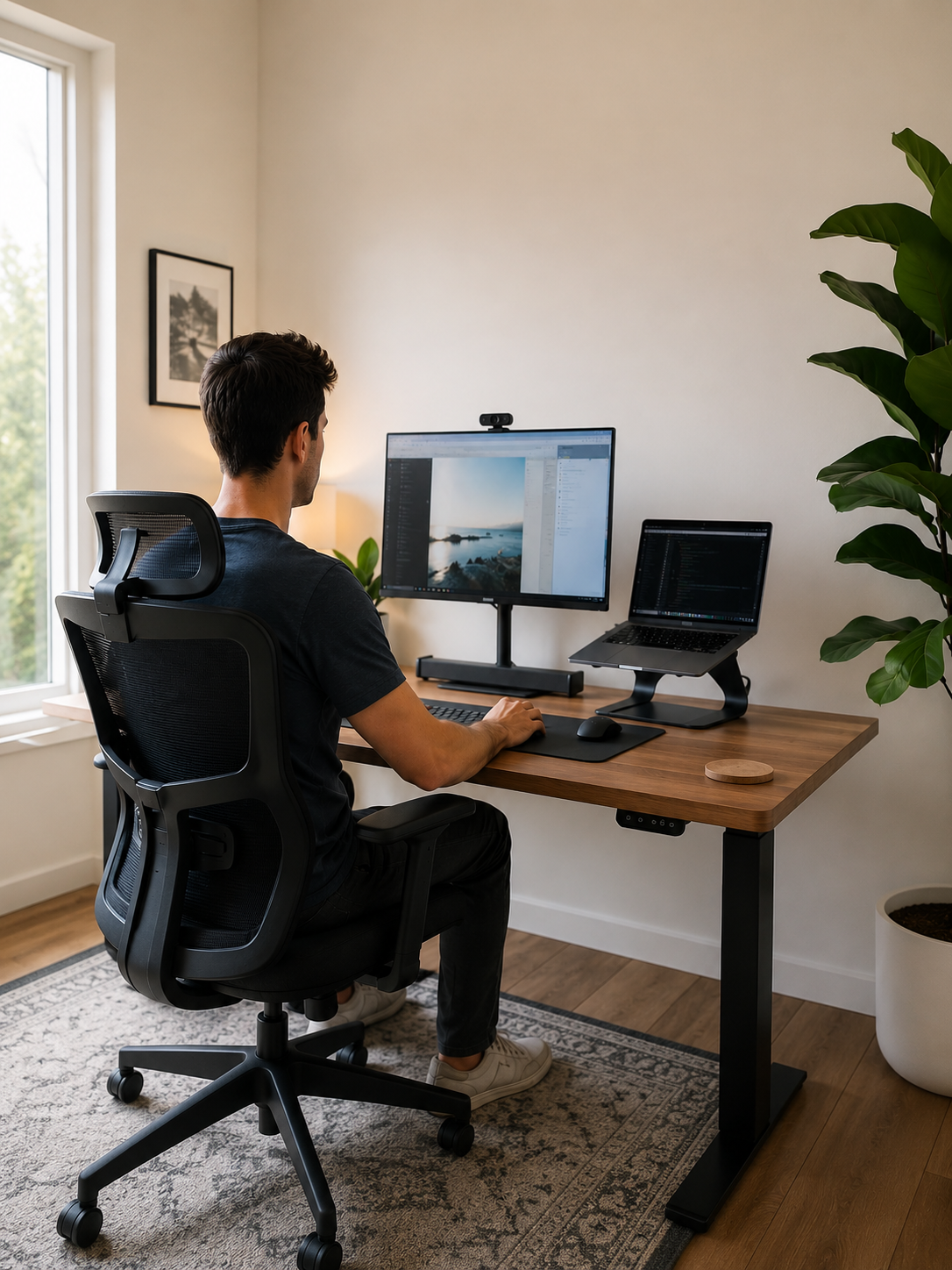
Designing a Minimalist Home Office with Ergonomics in Mind
A minimalist home office can be beautiful.
Clean lines. An uncluttered desk. A calming workspace that looks like it belongs in a design magazine.
But if you've been working from home for months—or years—you may have noticed something frustrating.
Your office looks great.
Yet by the end of the day, your neck feels tight.
Your shoulders ache.
Your lower back feels stiff.
And your focus starts fading long before your workday is over.
This is one of the biggest problems with modern home office design.
Many remote workers spend significant time creating a minimalist workspace, only to discover that aesthetics alone do not support comfort, posture, or productivity.
In fact, some of the most popular minimalist desk setups on social media quietly create ergonomic problems that become more noticeable with every hour spent working.
The laptop screen sits too low.
The chair provides little support.
The desk looks clean but doesn't support healthy positioning.
And because discomfort develops gradually, many people don't realize their workspace is contributing to the problem until symptoms become difficult to ignore.
If this sounds familiar, you're not alone.
According to research from the Occupational Safety and Health Administration (OSHA), poor workstation ergonomics can contribute to musculoskeletal discomfort affecting the neck, shoulders, back, wrists, and arms among desk workers.
The challenge is that many people assume they must choose between:
- A beautiful minimalist home office
- A comfortable ergonomic home office setup
Fortunately, that's not true.
The most effective workspaces combine both.
A truly well-designed home office should reduce visual clutter while also supporting your body throughout long workdays.
In this guide, you'll learn how to create a minimalist home office that looks clean, modern, and intentional—while also helping improve posture, reduce strain, and support better focus.
Because the best workspace isn't simply the one that looks good.
It's the one that still feels good at 5 PM.

The Hidden Problem with Many Minimalist Home Offices
Minimalism has become one of the most popular approaches to home office design.
And for good reason.
A clutter-free environment often feels calmer, more organized, and easier to focus in.
But many minimalist office setups share a common flaw.
They prioritize appearance over function.
At first glance, a simple desk with a laptop and a chair may seem ideal.
Yet after several hours of work, the body often tells a different story.
Common Problems Found in Minimalist Desk Setups
| Workspace Element | Common Minimalist Choice | Potential Ergonomic Issue |
|---|---|---|
| Laptop Only Setup |
Screen directly on desk |
Neck strain from looking down |
| Simple Chair |
Limited support |
Poor spinal alignment |
| Bare Desk Surface | Minimal accessories |
Lack of ergonomic support |
| Compact Workspace | Limited movement | Static posture fatigue |
These issues may seem minor initially.
The challenge is that the body adapts.
When the screen is too low, your neck compensates.
When lumbar support is missing, your lower back compensates.
When posture isn't supported, muscles work harder to maintain alignment.
Over time, those small compensations can become persistent discomfort.
This is especially common among remote workers who spend six, eight, or even ten hours sitting each day.
The irony is that many people create minimalist workspaces to reduce stress.
Yet physical discomfort becomes another source of stress entirely.
A workspace should simplify your day—not make it harder for your body to get through it.
The goal is not to add more equipment.
The goal is to ensure the items you keep actively support the way you work.

What Ergonomic Minimalism Actually Means
When people hear the word ergonomics, they often imagine bulky office equipment and complicated workstation adjustments.
When they hear minimalism, they picture simplicity and open space.
The reality is that these concepts work exceptionally well together.
In fact, the most effective minimalist home office setups are often built around ergonomic principles.
What Is Ergonomic Minimalism?
Ergonomic minimalism is the practice of creating a workspace where every item serves a meaningful purpose.
Nothing unnecessary.
Nothing distracting.
Nothing that compromises comfort.
Instead of asking:
"How can I make my desk look cleaner?"
You begin asking:
"How can I make my workspace support both my productivity and my well-being?"
This subtle shift changes everything.
A minimalist workspace should reduce two forms of clutter:
Visual Clutter
- Excess accessories
- Loose cables
- Unnecessary equipment
- Distracting decorations
Physical Clutter
- Awkward body positioning
- Unsupported posture
- Repetitive strain
- Unnecessary muscular effort
Most people focus only on visual clutter.
But physical clutter can be even more draining.
When your neck constantly strains forward or your shoulders remain tense all day, your body is dealing with a form of clutter that isn't visible but is very real.
The best minimalist workspaces remove both.
The Core Principles of Ergonomic Minimalism
- Keep only what supports your work.
- Position tools where the body can use them naturally.
- Reduce physical strain whenever possible.
- Prioritize comfort that can be sustained for long periods.
- Create an environment that promotes focus without sacrificing health.
A minimalist office should not feel empty.
It should feel intentional.
Every item should earn its place.
And that includes ergonomic support.

Start with the Foundation: Desk, Chair, and Layout
Before choosing accessories, productivity tools, or décor, it's important to build a solid ergonomic foundation.
Many people search for quick fixes while overlooking the elements that have the greatest impact on comfort.
The desk.
The chair.
The overall workstation layout.
These three factors influence nearly every aspect of posture.
The Ideal Ergonomic Home Office Setup
The goal is to support a neutral working posture.
This generally means:
| Body Area | Recommended Position |
|---|---|
| Feet |
Flat on floor |
| Knees |
Roughly 90 degrees |
| Elbows | Around 90 degrees |
| Wrists | Neutral position |
| Screen | At or near eye level |
| Shoulders | Relaxed, not elevated |
When these fundamentals are in place, the body spends less energy compensating for poor positioning.
As a result:
- Posture becomes easier to maintain.
- Muscle fatigue develops more slowly.
- Long work sessions feel more manageable.
- Productivity becomes more sustainable.
Why Layout Matters
Minimalist offices often focus on appearance.
But layout determines usability.
Ask yourself:
- Is everything within comfortable reach?
- Can you work without twisting your body?
- Do you frequently lean forward toward your screen?
- Do you shift positions constantly to stay comfortable?
These small observations often reveal opportunities for improvement.
A well-designed ergonomic workstation should work with your body, not against it.
And once that foundation is established, every additional improvement becomes more effective.
Improve Comfort Before Fatigue Sets In →
A Critical Insight Before You Keep Optimizing
At this point, many remote workers assume that adjusting their desk or chair will solve most of their discomfort.
Sometimes it helps.
But often, it only solves part of the problem.
Because even a well-positioned desk can be undermined by one of the most common tools in modern work:
The laptop.
And that's where many minimalist home office setups begin creating ergonomic challenges without realizing it.

Why Laptop Users Need Extra Attention
If you work primarily from a laptop, your workspace may look wonderfully minimalist.
Unfortunately, laptops create one of the biggest ergonomic challenges in any home office setup.
The issue is simple.
The keyboard and screen are attached.
When the keyboard is at a comfortable height for typing, the screen is usually too low.
When the screen is raised to eye level, the keyboard becomes too high to use comfortably.
As a result, most laptop users spend hours looking downward.
What Happens When Your Screen Is Too Low?
Over time, your body begins to adapt.
You may notice:
- Forward head posture
- Neck stiffness
- Upper back tension
- Rounded shoulders
- Eye strain
- Increased fatigue later in the day
These issues often develop gradually.
Many remote workers don't connect their discomfort to their laptop setup because the symptoms build slowly.
But the effect can be significant.
Even a slight forward head position increases the workload placed on the muscles of the neck and upper back.
The longer you work this way, the harder those muscles must work.
A Simple Adjustment with a Big Impact
One of the most effective ways to improve a minimalist ergonomic workspace is to elevate the screen closer to eye level.
This helps:
- Reduce neck flexion
- Encourage a more upright posture
- Improve viewing angles
- Reduce upper back strain
- Make long work sessions more comfortable
This is where a dedicated laptop stand can make a meaningful difference.
For remote workers who want to maintain a clean desk aesthetic, a solution like the Serenform Elevate Laptop Stand helps raise the laptop screen while preserving the simplicity of a minimalist workspace.
Rather than adding clutter, it creates a more intentional workstation.
The result is a setup that feels better without sacrificing the look you're trying to achieve.
Because good design should support your body—not force it to compensate.
How the Serenform Elevate Laptop Stand Works
Many posture problems begin with screen height.
When the screen sits too low:
- The head moves forward.
- The neck bends downward.
- The shoulders round.
- The upper back becomes overloaded.
A laptop stand addresses this by elevating the display to a more ergonomic viewing position.
The goal isn't to force perfect posture.
The goal is to reduce the amount of strain your body experiences throughout the day.
By helping position the screen higher:
- Neck alignment becomes easier to maintain.
- Upper back tension develops more slowly.
- Visual comfort often improves.
- Long work sessions feel less physically demanding.
Small adjustments create cumulative benefits.
Especially when repeated every day.
Support Better Posture Without Adding Desk Clutter →

Reducing Visual Clutter While Improving Focus
One of the biggest reasons people embrace minimalism is focus.
A clean workspace simply feels easier to work in.
And there is good reason for that.
Every object in your environment competes for attention.
The more visual information your brain must process, the more mental energy it consumes.
This is why clutter often feels exhausting—even when you're not consciously paying attention to it.
Visual Clutter Creates Hidden Mental Load
Common workspace distractions include:
- Excess desk accessories
- Tangled cables
- Multiple unused devices
- Papers scattered around the desk
- Notifications from multiple screens
Each of these adds small demands on attention.
Individually they may seem insignificant.
Collectively they create cognitive friction.
A minimalist workspace reduces these distractions and helps create an environment better suited for focused work.
Practical Ways to Reduce Workspace Clutter
Keep Only Daily Essentials Visible
Ask yourself:
"What do I use every single day?"
Those items deserve space on your desk.
Everything else can be stored elsewhere.
Manage Cables Intentionally
Visible cables quickly make a workspace feel chaotic.
Simple cable management can dramatically improve the appearance and usability of a desk setup.
Create Dedicated Zones
Separate work-related items from personal items.
This helps your brain associate the workspace with focused activity.
Reduce Digital Clutter Too
A cluttered desktop screen can be just as distracting as a cluttered physical desk.
Organize files, simplify notifications, and remove unnecessary distractions.
But Focus Isn't Just About What You See
Many people assume productivity problems come entirely from distractions.
Often, physical discomfort plays an equally important role.
When your neck hurts.
When your shoulders feel tight.
When your lower back becomes sore.
Part of your attention is constantly being pulled away from your work.
Discomfort becomes a distraction.
And unlike visual clutter, it's difficult to ignore.
This is why truly productive workspaces address both the mind and the body.

The Most Overlooked Element of Minimalist Design: Comfort
Many minimalist workspace guides focus on aesthetics.
They discuss color palettes.
Desk accessories.
Storage solutions.
Furniture styles.
What they rarely discuss is comfort.
Yet comfort is one of the most important factors affecting how your workspace performs.
Comfort Is Not a Luxury
For remote workers, comfort directly affects:
- Productivity
- Concentration
- Energy levels
- Posture
- Long-term sustainability
When sitting becomes uncomfortable, the body begins searching for relief.
You may:
- Slouch forward
- Shift constantly
- Cross your legs repeatedly
- Lean on one side
- Rest your head in your hand
These adjustments often feel temporary.
But over time they can reinforce poor positioning and increase strain.
Why DIY Fixes Often Fall Short
Many people try:
- Folding blankets
- Using decorative cushions
- Stacking books
- Improvising support solutions
While these approaches may provide short-term relief, they often require frequent adjustments.
They slide.
Compress.
Lose effectiveness.
Or simply become inconvenient to maintain.
The challenge isn't finding relief once.
The challenge is creating support that works consistently every day.
Consistency matters.
Because posture isn't determined by a single moment.
It's influenced by thousands of hours spent working over weeks, months, and years.
A workspace that supports your body consistently makes healthy positioning easier to maintain.
And that's often the difference between temporary comfort and sustainable comfort.
Transition: Why Fixing One Problem Often Isn't Enough
At this point, you may have noticed a pattern.
Improving screen height helps.
Reducing clutter helps.
Adjusting desk positioning helps.
But each improvement addresses only one piece of a larger system.
The reality is that posture, comfort, and productivity are deeply connected.
If one area remains unsupported, the body often compensates elsewhere.
This is why the most effective ergonomic home office setups are designed as complete environments—not isolated fixes.
And before deciding what changes to make, it's worth understanding what an ideal minimalist ergonomic workspace actually looks like.

Building the Ideal Minimalist Ergonomic Workspace
By now, you've seen that creating a minimalist home office isn't simply about removing items from your desk.
It's about intentionally choosing what stays.
The most effective minimalist workspaces are not the emptiest.
They are the most supportive.
They eliminate distractions while preserving the tools that improve comfort, posture, and productivity.
When designing your own minimalist ergonomic desk setup, think in terms of function first and appearance second.
Interestingly, when functionality improves, aesthetics often improve as well.
A workspace that feels organized, balanced, and intentional naturally looks cleaner.
The Essential Elements of an Ergonomic Minimalist Workspace
Use this checklist as a foundation:
| Essential Element | Why It Matters |
|---|---|
| Eye-level screen positioning |
Reduces neck strain |
| Comfortable chair support |
Promotes spinal alignment |
| Proper desk height | Improves arm and shoulder positioning |
| Minimal visual clutter | Reduces distractions |
| Organized cables | Creates a cleaner environment |
| Ergonomic laptop setup | Improves posture during work |
| Dedicated work zone | Encourages focus |
| Adequate lighting | Reduces eye fatigue |
Notice what isn't on this list.
Expensive décor.
Dozens of productivity gadgets.
Complex workstation accessories.
The goal is not more equipment.
The goal is more intentional support.
Quality Over Quantity
One of the core principles of minimalist design is investing in fewer, better tools.
The same philosophy applies to ergonomics.
Rather than filling your desk with random accessories, focus on solutions that address the biggest sources of strain.
For many remote workers, that starts with screen positioning.
Because if your laptop sits too low every day, even the cleanest desk setup can become physically exhausting.
Small improvements compound.
A better screen height today can influence hundreds of working hours over the coming months.
And those benefits add up.
Create a Workspace That Supports Better Focus and Comfort →

How Ergonomic Support Improves Your Workday
Many people think ergonomic products are designed simply to reduce pain.
While comfort is certainly important, the real benefit is broader.
Good ergonomic support changes how your body experiences work.
What Happens Without Support
When a workstation lacks proper alignment:
- Muscles work harder than necessary.
- The body compensates for poor positioning.
- Fatigue develops more quickly.
- Discomfort becomes distracting.
- Focus becomes harder to sustain.
The body is constantly making small adjustments just to stay comfortable.
This uses energy that could otherwise be directed toward productive work.
What Happens With Better Support
When your workstation encourages healthier positioning:
- Posture becomes easier to maintain.
- Muscle tension develops more slowly.
- Long sitting sessions feel more manageable.
- Concentration improves.
- Work becomes less physically draining.
This doesn't mean discomfort instantly disappears.
But it does mean your environment is no longer actively working against you.
Why Screen Position Matters So Much
For laptop users especially, screen height influences multiple parts of the body simultaneously.
A low screen can contribute to:
- Forward head posture
- Rounded shoulders
- Neck tension
- Upper back fatigue
By elevating the screen to a more natural viewing position, the body no longer needs to compensate as aggressively.
This is one reason the Serenform Elevate Laptop Stand can be such a valuable addition to a minimalist workspace.
It helps address one of the most common ergonomic challenges while maintaining the clean, streamlined appearance many remote workers want.
The goal isn't perfection.
The goal is reducing unnecessary strain so your workspace becomes easier to use day after day.
Because sustainable comfort often comes from small improvements that consistently support better habits.
Reduce Daily Strain and Support Better Alignment →

What Should You Do Next?
If you've been struggling with discomfort while working from home, it's easy to feel overwhelmed.
There are countless articles.
Thousands of desk setup videos.
Endless productivity hacks.
Yet many remote workers still finish the day feeling sore, stiff, and mentally drained.
That's because most advice focuses on individual fixes.
Adjust your chair.
Raise your monitor.
Sit differently.
Take more breaks.
While these recommendations can help, they often fail to address the bigger picture.
Your workspace functions as a system.
And systems perform best when all the parts work together.
Ask Yourself These Questions
- Do you regularly look down at your laptop screen?
- Does your neck feel tight after work?
- Do your shoulders become tense during long tasks?
- Do you struggle to stay comfortable while sitting?
- Does your workspace look good but feel exhausting?
If you answered yes to several of these questions, your setup may be missing ergonomic support where it matters most.
The good news is that meaningful improvements don't require a complete office redesign.
Often, a few targeted upgrades create the biggest impact.
For many remote workers, improving screen height is one of the simplest and most effective places to start.
Because every hour spent looking down reinforces the same patterns that contribute to discomfort.
The sooner those patterns are addressed, the easier they are to change.
You don't need a more complicated workspace.
You need a more supportive one.

A Minimalist Workspace Should Support More Than Your Aesthetic
A beautiful home office can inspire you to sit down and start working.
But comfort determines whether you can continue working effectively throughout the day.
That distinction matters.
Because productivity isn't created by appearances.
It's created by environments that support both focus and physical well-being.
When designing a minimalist home office with ergonomics in mind, remember:
- Minimalism is not about removing everything.
- It's about keeping what truly matters.
- Comfort is not clutter.
- Ergonomic support is not a luxury.
- Posture is influenced by environment, not willpower alone.
Many remote workers spend years trying to sit straighter, concentrate harder, or push through discomfort.
Yet the real solution often starts with improving the workspace itself.
A well-designed environment makes healthy habits easier.
And one of the most impactful changes laptop users can make is improving screen positioning.
The Serenform Elevate Laptop Stand was designed around this principle.
By helping elevate your laptop to a more ergonomic viewing height, it supports better alignment while preserving the clean, modern aesthetic that makes minimalist workspaces appealing.
The result is a setup that feels as good as it looks.
And that's the real goal.
Not simply creating a workspace that photographs well.
Creating a workspace that supports your body, your focus, and your work every single day.
Explore a Cleaner, More Comfortable Way to Work →
If your current setup leaves you feeling stiff, distracted, or fatigued by the end of the day, now is the time to make a change.
Small ergonomic improvements made today can influence how you feel during every workday that follows.
Your workspace should help you do your best work—not make it harder.
Start by creating a home office that supports both simplicity and comfort.
Your neck, back, and future self will thank you.