The Desk Setup For Focus That Improves Productivity
The workday often begins with energy and clarity—tasks are outlined, priorities are set, and momentum feels strong. Yet by mid-afternoon, many professionals experience a familiar decline: concentration wanes, productivity slows, and routine responsibilities demand more effort than they should.
While factors such as workload and digital distractions play a role, one of the most overlooked contributors to this loss of focus is the physical environment itself. A poorly designed desk setup can lead to subtle but persistent discomfort—strained posture, awkward screen angles, or insufficient support—that gradually drains mental energy. Ergonomic design is a key factor in creating a workspace that supports focus and minimizes distractions.
Research underscores this connection. According to the American Productivity Audit, U.S. companies lose an estimated $225.8 billion annually due to reduced productivity linked to health-related factors, including musculoskeletal discomfort from poor ergonomics. The principles of ergonomic design, such as promoting comfort, safety, and usability, play a crucial role in preventing musculoskeletal disorders that can arise from improper posture and repetitive movements. In other words, even minor workplace strain translates into significant performance costs over time.
The encouraging reality is that focus can be preserved, and even enhanced, with a workspace designed to support both body and mind. Strategic ergonomic adjustments and thoughtful workspace organization not only reduce physical strain but also contribute to greater efficiency in work performance, freeing up cognitive resources and allowing you to stay engaged and productive throughout the day.
In this article, we will explore how to create a simple desk setup for focus, with practical recommendations that apply across a variety of work environments—whether you are working from home, adapting to a hybrid schedule, or making the most of a compact space. Each adjustment is straightforward, evidence-based, and designed to help you sustain concentration and improve overall performance.

How Discomfort Steals Your Focus
Discomfort at your desk is more than a nuisance—it is a hidden drain on concentration and productivity. A chair set too low, a monitor positioned just slightly off-center, or wrists angled awkwardly at the keyboard may seem like minor inconveniences, but over the course of a workday they accumulate into constant, low-level strain.
This strain is not merely physical. When your body is uncomfortable, your brain is forced to divide its attention between the task at hand and the signals of tension coming from your muscles and joints. Even subtle neck or back pain pulls cognitive resources away from focused work, creating a steady pattern of distraction.
The research supports this connection. The National Institute for Occupational Safety and Health (NIOSH) has documented that musculoskeletal discomfort contributes directly to reduced work performance and increased fatigue. In practical terms, this means that poor ergonomics can slow progress, shorten attention spans, and contribute to early burnout in the workday.
Practical Adjustments to Restore Focus
Fortunately, a few targeted adjustments can significantly reduce this source of distraction— especially when you adjust your workspace to fit your needs—can significantly reduce this source of distraction. These recommendations are based on ergonomic principles, which are fundamental for creating safe and comfortable work environments:
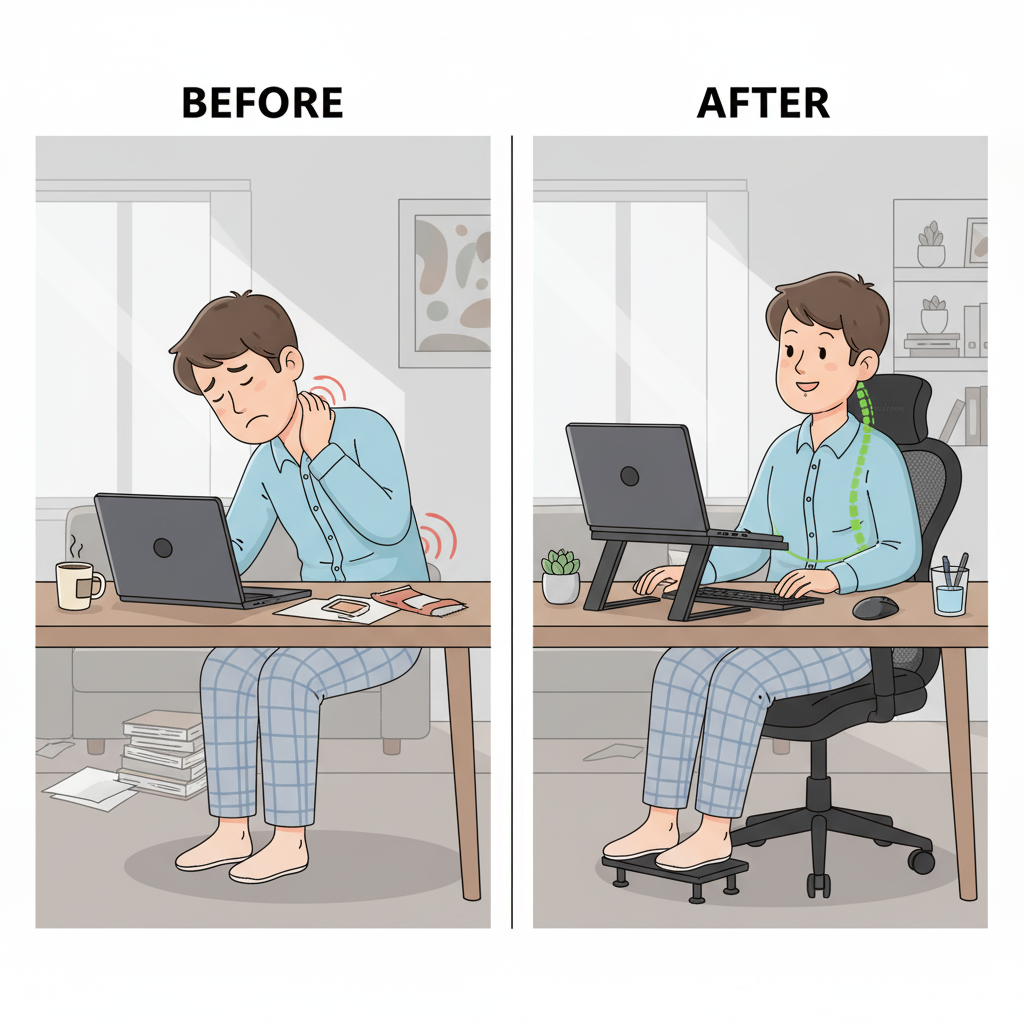
- Position Your Monitor at Eye Level - The top third of your screen should align with your natural eye line. For laptop users, elevating the screen with a stand prevents the downward tilt that strains the neck.
- Maintain a Neutral Sitting Posture - Keep your feet flat on the floor (or on a footrest), with hips and knees at roughly 90 degrees. This stable base reduces stress on your lower back.
- Align Your Keyboard and Mouse - Wrists should remain straight, with elbows relaxed and close to your body to avoid unnecessary strain.
Incorporating short periods of rest throughout your workday is also essential to prevent fatigue and maintain focus.
👉 Ergonomic Tip: If you often work from a laptop, consider using a stand to bring the screen to eye level. A simple adjustment like this helps reduce neck and shoulder tension, making it easier to maintain focus. The Serenform Elevate Laptop Stand is one option designed for this purpose.

A Simple Setup for Any Space
A well-designed desk setup is not limited to those with a dedicated home office. Choosing the right furniture, such as ergonomic desks and chairs, is essential for creating an organized and functional workspace in any environment. In reality, many professionals are working from kitchen tables, makeshift corners, or shared spaces that were never intended for full workdays. The encouraging news is that improving focus does not require an elaborate office or a large budget. With a few strategic adjustments, even the smallest or most temporary workspace can support concentration and comfort. Ergonomic setups can be adapted to various workplaces and rooms, ensuring that different environments meet the needs of their users.
When planning your setup, consider selecting appropriate materials for your desk and accessories to enhance comfort and efficiency.
Space-Smart Ergonomics
- Elevate Your Laptop - Working directly from a low screen encourages a forward head posture that leads to strain. Elevating your laptop - whether with a stack of books or a slim, adjustable stand - helps align the screen at eye level and immediately improves posture. Using monitor arms can also free up desk space and improve ergonomics.
- Incorporate External Tools - Adding a compact external keyboard and mouse allows for a more natural typing position, reducing tension in the wrists and shoulders while making your workspace more adaptable. Arrange each tool purposefully to support your main task and maintain an efficient workflow.
- Declutter for Mental Clarity - Visual clutter competes for attention and reduces working memory, making it more difficult to concentrate on tasks. Keeping your desk surface clean and intentional enhances mental focus. Use drawer and drawer dividers to keep documents and stationery organized and separated. Desk organizers and other organizational tools help maintain an organized desk by providing compartments for essentials and reducing clutter. Organizing and keeping your workspace organized boosts focus and productivity. Limit personal items on your desk to maintain a clutter-free environment. Prioritize only the essentials on your desk to optimize space. Use a file holder or digital files system to manage documents and paper efficiently. Good cable management is key—organize cables with trays or sleeves for a cleaner, safer look. Consider standing desks and alternate between sitting and standing to reduce fatigue and promote health.
Minimalist Hacks
- Repurpose Everyday Items – A sturdy shoebox or stack of firm books can serve as a makeshift footrest, keeping your posture balanced if your chair sits too high.
- Define the Space with Lighting – A small desk lamp or task light can create a sense of boundary between “work” and “home,” even when you are sharing a table or corner space. Good lighting also reduces eye strain and helps maintain alertness. A well-lit workspace also supports the process of focused work by minimizing distractions and helping you stay on task.
| Adjustment | Why It Matters | Easy Implementation |
|---|---|---|
| Laptop elevation | Prevents neck and shoulder strain | Use a stand or books |
| External keyboard + mouse |
Reduces wrist and arm tension | Compact wireless set |
| Declutter workspace |
Frees mental bandwidth, improves focus | Remove non-essential items |
| Foot support | Keeps posture balanced, reduces leg fatigue | Shoebox, books, or compact footrest |
| Task lighting | Defines workspace, reduces eye strain | Small desk lamp or daylight bulb |
These ergonomic adjustments can also improve the quality of your work by reducing physical strain and supporting better concentration.
Be intentional with what you fill your workspace with—choose items like plants or art that inspire you, and avoid clutter to maintain a calm, focused environment.
👉 Ergonomic Tip: For those who often work in small or flexible spaces, a compact footrest can make a noticeable difference in comfort and focus. The Serenform Axis Footrest is one example designed to support posture without taking up extra room.

Managing Cables and Wires for a Tidy Workspace
A tangle of cables and wires can quickly turn even the most thoughtfully arranged desk into a source of distraction and stress. Effective cable management is one of the simplest desk organization ideas that can transform your desk space from cluttered to streamlined. By using cable management tools—such as clips, sleeves, or under-desk trays—you can keep cords neatly bundled and out of sight, instantly making your workspace feel more organized and inviting.
Drawer organizers also play a vital role in keeping smaller desk supplies and equipment, like chargers and adapters, easily accessible but out of the way. This not only enhances the visual appeal of your office but also supports better time management, as you’ll spend less time untangling cords or searching for the right cable. A tidy workspace allows you to focus on your main tasks, boosting productivity and reducing unnecessary stress.
Beyond aesthetics, organized cables contribute to a safer and more ergonomic environment. Proper cable management helps prevent tripping hazards and allows for easier adjustment of monitor arms and other ergonomic tools, supporting a comfortable posture and reducing the risk of musculoskeletal disorders associated with prolonged sitting. By keeping your desk and drawers free from cable clutter, you create a workspace that supports both your well-being and your ability to do your best work.
Creating a Comfortable Ambiance
The ambiance of your workspace is more than just a backdrop—it’s a critical factor in your ability to focus, stay productive, and feel well throughout the day. Thoughtful ergonomic design, starting with the right lighting and seating, sets the foundation for a physical environment that supports both comfort and efficiency. Proper lighting, whether from natural sources or a well-placed desk lamp, reduces eye strain and helps maintain energy levels, while an ergonomic chair encourages a healthy posture.
Incorporating organizational tools like desk organizers and drawer dividers helps keep your workspace free from clutter, making it easier to concentrate on your job and reducing the mental load that comes from a disorganized environment. Standing desks and adjustable monitor arms offer the flexibility to adapt your setup to your needs, allowing you to alternate between sitting and standing and to position your monitor at the ideal height for your comfort.
By prioritizing these ergonomic principles and using essential tools to create a comfortable ambiance, you not only reduce stress but also foster a workspace where creativity and focus can thrive. A well-designed environment supports your well-being, enabling you to produce your best work and approach each task with clarity and confidence.

The Mind-Body Connection at Your Desk
Focus is not determined by physical setup alone—it is equally shaped by how your environment supports mental clarity and well-being. A well-designed desk setup can foster new ideas and support creative thinking. A desk that reduces physical strain does more than protect posture; it also frees the brain from the constant, low-level distractions caused by discomfort, reinforcing the idea that workspace design can directly influence mental clarity. The result is more cognitive energy available for deep, sustained work. An intentional workspace supports meaningful work and helps you do your best work.
Ergonomics and Mental Energy
- Posture and Stress: Research has consistently shown that posture influences psychological state. Poor posture is linked to increased fatigue and stress, while sitting upright has been associated with improved mood and greater cognitive performance. The development of ergonomic furniture and tools is a result of multidisciplinary engineering efforts focused on improving user comfort and safety.
- The Role of Light: Lighting also plays a critical role. Natural light exposure has been shown to increase productivity by up to 15% among office workers, according to the World Green Building Council. Adequate lighting reduces eye strain and helps regulate energy levels throughout the day. Advances in information technology have enabled better workspace lighting solutions by allowing for automated adjustments and personalized lighting controls.
- Environment and Focus: A cluttered or overstimulating environment forces the brain to divide attention, making it harder to remain fully engaged in a task. A streamlined, intentional workspace encourages calm and focus.
Practical Adjustments to Enhance Clarity
- Prioritize Natural Light: Whenever possible, position your desk near a window. If natural light is limited, consider a daylight-balanced lamp to mimic its benefits.
- Stay Hydrated: Keeping water within reach prevents the dips in energy and concentration linked to dehydration.
-
Create Breathing Room: Limit the number of items on your desk surface to only what you need for work. A clear workspace allows for a clearer state of mind and supports better time management by reducing distractions and making it easier to focus on tasks.
The key point is that maintaining a clear workspace is essential for improving focus and productivity.
Tools and Accessories That Support Focus
Even with the right habits in place, certain tools can make a significant difference in maintaining focus throughout the day. The best ergonomic desk setups not only prevent discomfort but actively support productivity by promoting healthier posture and reducing unnecessary strain.
Accessories Worth Considering
-
Monitor Stands & Laptop Risers – Help align the screen with your natural eye level, reducing neck and shoulder tension.
-
Footrests – Encourage balanced posture and reduce fatigue in the lower body during long work sessions.
-
Ergonomic Chairs – Provide structured lumbar support, promoting a natural spinal position.
-
Keyboard Trays – Keep wrists neutral and elbows relaxed, reducing the risk of repetitive strain.
Why These Tools Matter
When discomfort is minimized, the brain no longer has to “split focus” between the work task and the signals of strain coming from the body. Over time, this translates into greater concentration, longer periods of deep work, and measurable improvements in productivity.
👉 Ergonomic Tip: If you spend long hours working from a laptop, a riser or stand can help prevent neck strain by lifting your screen to eye height. The Serenform Elevate Laptop Stand is one example designed for this purpose. Similarly, adding a compact footrest, such as the Serenform Axis Footrest, can support proper posture and reduce fatigue in smaller workspaces.

Small Adjustments, Big Results
Improving focus at work does not require a full office renovation or an extensive investment in new equipment. In many cases, it comes down to a series of small, intentional changes—raising your screen to eye level, supporting your posture with the right seating or footrest, and reducing visual distractions on your desk. These adjustments may seem minor, but their impact compounds over the course of the workday.
The result is tangible: greater energy in the afternoon, less physical fatigue, and the ability to sustain deeper concentration for longer periods of time. By aligning your environment with your body’s natural needs, you free your mind to concentrate on the work that matters most.
The most effective part of this approach is its accessibility. Many improvements can be implemented immediately, with little more than a thoughtful rearrangement of your workspace or the addition of one or two ergonomic tools. Taken together, these refinements create a desk setup that supports both productivity and well-being.
👉 Next Step: If you are ready to explore ergonomic solutions designed specifically for people who work from home, Serenform Ergonomics offers products that make these small but important adjustments easy to put into practice.