Neck and Shoulder Pain Relief from Desk Work: How to Achieve It
Neck and shoulder pain are now among the most widespread concerns for individuals who spend extended hours working at a desk. Whether you are operating from a home office, a corporate environment, or a study space, the combination of poor desk posture, improper screen height, laptop-driven forward head posture, and long periods of static sitting places continuous strain on the upper body. Over time, these factors contribute to muscle fatigue, reduced mobility, and persistent discomfort—often without people realizing the root cause.
The encouraging news is that these issues are highly correctable. With targeted ergonomic adjustments, improved alignment, and strategic use of supportive tools, it is entirely possible to reduce or even eliminate neck and shoulder strain. These interventions not only alleviate daily discomfort but also support long-term spinal health and improved productivity.
This guide provides structured, evidence-informed solutions tailored to the needs of different types of desk workers. By addressing the specific habits and environments that contribute to discomfort, the recommendations that follow are designed to help you create a workspace that supports healthier posture, greater comfort, and sustained well-being.
Why Neck and Shoulder Pain Is So Common for Desk Workers
Neck and shoulder discomfort is not merely a byproduct of long work hours—it is often the direct result of how the body responds to sustained, suboptimal posture. Each time you lean forward toward your screen, elevate your shoulders in tension, or crane your neck to read text, you increase the mechanical load on the cervical spine and surrounding musculature. These seemingly small posture deviations accumulate over time, creating a cycle of overworked muscles, restricted mobility, and persistent upper-body strain. Neck pain caused by these poor habits is a leading source of discomfort for many desk workers.
Desk workers commonly experience this because the modern workstation encourages patterns that the body is not designed to maintain for hours at a time. Several factors contribute to this widespread issue:
-
Forward-head posture (“tech neck”)
When the head tilts forward, even by a few centimeters, the perceived weight on the neck multiplies, placing excessive stress on the upper trapezius and deep cervical muscles. -
Low or distant monitors
Screens positioned too low or too far away prompt constant leaning, drawing the head and shoulders forward and reinforcing poor alignment. -
Lack of lower-back support
When the lumbar spine collapses into a rounded position, the upper back and shoulders must compensate to keep the body upright, resulting in tension across the neck and shoulder girdle. -
Prolonged static sitting
Remaining in one position for extended periods reduces circulation, weakens postural endurance, and increases muscular fatigue—especially in the upper back and neck. This often leads to muscle tension and neck strain, which are common results of sitting too long without movement. - Laptop-dominated work setups
Laptops naturally pull the gaze downward, encouraging slumped posture and increased strain on the cervical spine.
Understanding these root causes is essential to implementing lasting, effective solutions. When you address the structural contributors—not just the symptoms—you set the foundation for long-term relief and healthier posture habits.

Immediate Fixes for Home Office Neck Pain
Remote work environments often lack the structured support provided by traditional office setups. Dining chairs, sofas, and low coffee tables—common substitutes for dedicated workstations—are not designed for prolonged sitting or ergonomic alignment. When your laptop sits below eye level or your back lacks adequate support, your head naturally shifts forward, increasing the load on the cervical spine. As a result, the shoulders tense, the upper traps overactivate, and the upper back must work harder to stabilize your posture throughout the day.
Fortunately, several simple adjustments can provide meaningful relief and significantly improve your working comfort. These practical ergonomic changes can help relieve pain quickly and can be implemented immediately with minimal investment.
Ergonomic Adjustments You Can Apply Today
1. Raise your laptop to eye level
Elevating your screen is one of the most effective ways to reduce forward-head posture. A laptop stand is ideal, but even stacked books or boxes can shift your gaze upward and bring your neck into a more neutral position.
2. Add structured back support to reduce upper-body strain
Proper lumbar support helps maintain the natural curve of the spine and prevents the lower back from collapsing into a rounded position. When the lumbar region is unsupported, the upper body compensates, often resulting in shoulder elevation and increased neck tension.
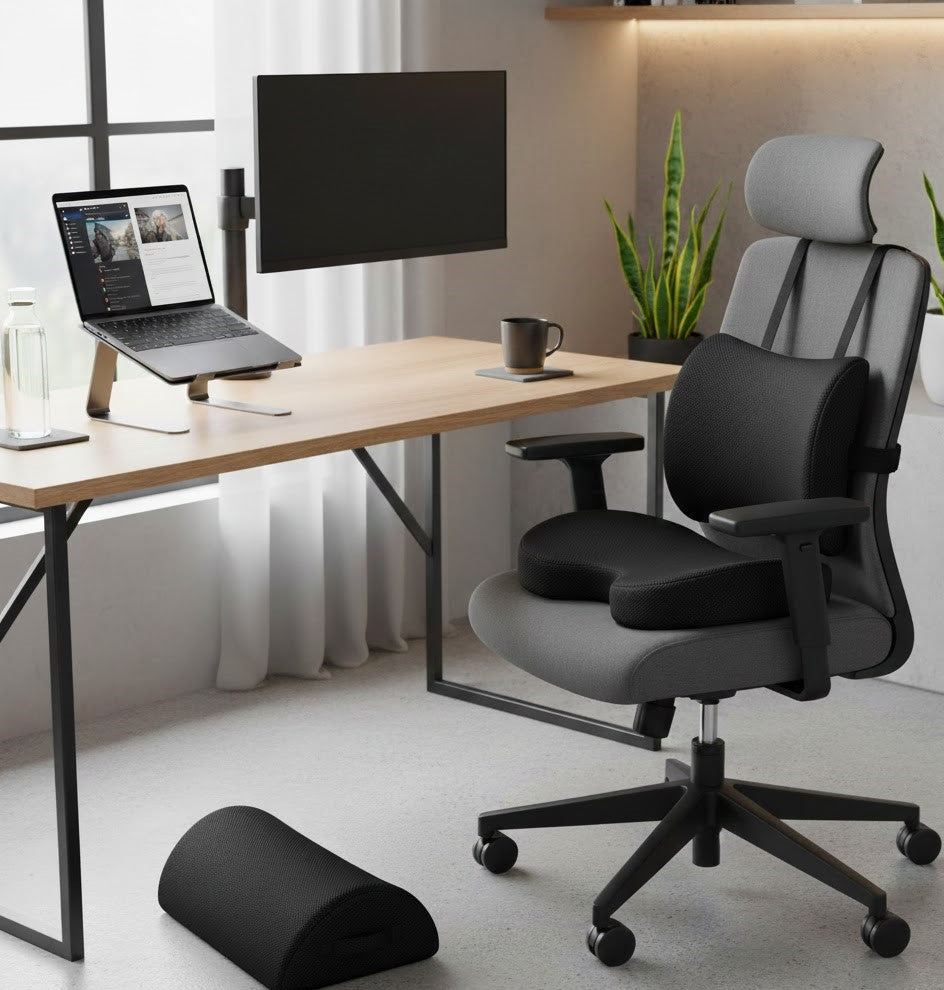
The Serenform Atlas Lumbar Pillow offers firm, anatomical support designed to improve alignment and reduce the burden on the upper back and shoulders.
3. Sit on a supportive cushion to enhance pelvic alignment
A high-quality seat cushion promotes neutral pelvic positioning, reducing slouching and helping the spine maintain a more balanced posture. Improved pelvic alignment directly reduces the stress placed on the neck and upper back.
4. Use a chair with adequate arm support
When the arms are unsupported, the shoulders must work continuously to hold them in position, leading to upper trapezius activation and fatigue. Chairs with adjustable armrests—or the addition of supportive arm cushions—can significantly reduce this strain.
By implementing these targeted adjustments, you create a foundation for healthier posture and more comfortable work sessions, even without a traditional office setup.

Reducing Repetitive Strain from Office Setups
Even in well-equipped corporate environments, subtle workstation misalignments can contribute to significant neck and shoulder discomfort over time. A monitor positioned just an inch too low, armrests adjusted slightly too high, or a keyboard placed too far forward may seem inconsequential in the moment—but repeated daily, these small deviations place continuous strain on the upper body. Remaining in the same position for extended periods can further contribute to stiffness and discomfort. Over weeks or months, this leads to muscle fatigue, reduced mobility, and recurring pain associated with repetitive desk work.
Optimizing your workstation with intentional ergonomic adjustments can greatly reduce these risks and promote healthier posture throughout the workday. Taking regular movement breaks helps prevent neck strain and is effective in reducing muscle tension, supporting long-term neck and shoulder pain relief.
How to Optimize Your Office Workstation
1. Monitor height and viewing distance
-
The top edge of the screen should be level with your eyes.
-
The monitor should sit approximately an arm’s length away.
Positioning the display at the correct height and distance minimizes neck extension and prevents the forward lean that often contributes to upper-back and cervical strain.
2. Maintain neutral shoulder placement
Elbows should rest comfortably at 90–100 degrees, with forearms fully supported by armrests or the desk surface.
-
Armrests that sit too high cause the shoulders to elevate and tighten.
-
Armrests that sit too low promote slouching and rounded shoulders.
Achieving neutral alignment helps limit upper trapezius activation and reduces unnecessary shoulder tension.
3. Position the keyboard and mouse within natural reach
Tools placed too far forward cause reaching, which pulls the shoulders away from the body and places additional stress on the upper back.
Keeping these items within a close, natural range encourages relaxed shoulders and prevents repetitive strain.
4. Incorporate movement throughout the day
No matter how well your desk is arranged, staying in a fixed position for long periods drains postural muscles. Incorporate brief movement breaks to reset alignment, stimulate circulation, and reduce muscle fatigue.
The 20–20–20 rule is a simple strategy: every 20 minutes, rest your eyes by looking 20 feet away for 20 seconds. This also provides a cue to relax the shoulders and bring the head back into neutral posture.
These adjustments help create a more supportive and sustainable workstation—one that not only enhances comfort but also promotes long-term physical well-being.

Long-Term Relief Through Ergonomic Products
Many individuals who spend significant time at a desk recognize the importance of ergonomics, yet continue to experience discomfort because their workspace lacks the appropriate supportive tools. Even when posture awareness is high, poor alignment caused by inadequate equipment forces the neck, shoulders, and upper back to compensate for the spine. Over time, this leads to muscular overload, chronic tension, and reduced efficiency.
Investing in purposefully designed ergonomic products can transform the workstation into an environment that supports healthy alignment and sustained comfort. These tools do more than enhance the sitting experience—they fundamentally improve the way the body maintains posture throughout the day. In addition, ergonomic products can provide effective pain relief for those suffering from neck and shoulder discomfort.
Upgrading your workspace with ergonomic chairs, adjustable desks, and supportive accessories not only promotes long-term comfort but also offers significant benefits for neck and shoulder pain relief.
Recommended Ergonomic Upgrades
1. A high-quality lumbar pillow
Effective lumbar support is foundational to a healthy sitting posture. By maintaining the natural curve of the lower spine, a lumbar pillow prevents the pelvis from tilting backward and reduces the cascading strain that travels up the back, shoulders, and neck.
The Serenform Atlas Lumbar Pillow provides sculpted, firm support with adjustable straps that ensure a secure fit on most chairs. Its ergonomic design promotes spinal alignment, reduces slouching, and minimizes shoulder elevation caused by inadequate lower-back support.
2. A laptop or monitor stand
Raising the screen to eye level is essential to correcting forward-head posture, a leading cause of neck pain from desk work. A stand ensures that the head remains in neutral alignment, reducing the burden on the cervical spine and upper traps.
3. A supportive seat cushion
Proper pelvic alignment is a critical, often overlooked component of upper-body comfort. A seat cushion designed for ergonomics helps position the pelvis neutrally, stabilize the spine, and prevent the forward rounding that contributes to neck and shoulder tension.
4. An external keyboard and mouse
When the laptop is elevated, external input devices become necessary to maintain correct elbow and shoulder positioning. Keeping the arms close to the body and the wrists in a neutral position significantly reduces the muscular strain associated with poor workstation setups.
These ergonomic enhancements work together to create a posture-supportive environment that reduces physical stress, increases comfort, and promotes long-term musculoskeletal health. Rather than simply masking discomfort, they address the structural factors that drive repetitive strain.

Preventing Early Neck and Shoulder Pain from Long Study Sessions
Students today spend a significant portion of their time reading, typing, and completing assignments on laptops—often in environments that are not designed for prolonged sitting. Studying on beds, floors, couches, or in tight library cubicles places the body in sustained positions that compromise spinal alignment and make it difficult to maintain good posture, which is key to preventing discomfort. Over time, these habits can lead to early signs of repetitive strain, including neck stiffness, shoulder tension, and upper-back fatigue.
Establishing healthy posture practices early is essential. With a few strategic adjustments, students can protect their musculoskeletal health and build habits that support comfort and focus throughout their academic journey. Taking steps to prevent neck pain and prevent neck issues through early intervention can make a significant difference. During long study sessions, incorporating simple strategies to ease neck discomfort—such as gentle stretching, changing positions, and taking regular breaks—can help reduce tension and support overall neck and shoulder pain relief.
Simple Posture Improvements for Students
1. Raise your laptop to reduce neck flexion
Laptops naturally encourage a downward gaze, which increases the stress placed on the cervical spine. Elevating the screen—even by a few inches—helps bring the head into a more neutral position, significantly lowering the risk of neck pain from studying.
2. Choose a supportive chair whenever possible
Soft seating surfaces like beds and couches allow the pelvis to sink and the spine to round. Selecting a firm, supportive chair with a backrest promotes upright posture and reduces the tendency to slump during long study sessions.
3. Structure study sessions into 30–45 minute intervals
The body’s postural endurance is limited. Short, consistent breaks help maintain muscular balance, improve circulation, and reset alignment. Even standing, stretching, or walking briefly can reduce the cumulative strain on the neck and shoulders.
4. Consider affordable ergonomic upgrades
Ergonomic support doesn’t need to be expensive. Lightweight, portable tools can make a meaningful difference in posture and comfort:
-
A portable lumbar pillow reinforces proper spinal curvature.
-
A foldable laptop stand raises the screen to eye level and is easy to transport.
-
A compact seat cushion improves pelvic positioning and reduces slouching.
These simple additions help students avoid posture patterns that, if left unaddressed, may lead to long-term discomfort well into adulthood.

Correcting Tech Neck and Preventing Future Strain
Individuals who are mindful of their physical health often seek to understand the underlying biomechanics that contribute to discomfort. “Tech neck”—a posture pattern characterized by forward-head positioning and rounded shoulders—develops gradually as the demands of desk work shorten the chest muscles, weaken the deep neck and upper-back stabilizers, and overstretch the posterior chain. Over time, this imbalance places excessive strain on the cervical spine, leading to persistent neck tension, upper-back fatigue, and reduced mobility. Improving range of motion in the neck is also a key benefit of addressing tech neck, as it enhances flexibility and overall neck function.
Addressing tech neck effectively requires a combination of targeted strengthening, including exercises that focus on the neck muscles, strategic mobility work, and consistent ergonomic support. When these elements work together, they help restore balanced posture and prevent future strain. Physical therapy and breathing exercises can also be valuable strategies for managing neck and shoulder tension, supporting a comprehensive approach to neck and shoulder pain relief.
How to Correct Tech Neck and Shoulder Tension
1. Strengthen the deep neck flexors
Exercises such as chin tucks activate the deep stabilizing muscles at the front of the neck, helping draw the head back into alignment with the spine. Strengthening these muscles reduces the load placed on the upper trapezius and improves overall cervical control.
2. Strengthen scapular stabilizers for better shoulder mechanics
Movements such as rows, band pull-aparts, and Y/T/W exercises promote engagement of the middle and lower trapezius, rhomboids, and rotator cuff. These muscles support proper shoulder positioning and counteract the rounding that accompanies prolonged computer use.
3. Stretch and open the chest
Tight pectoral muscles contribute to forward-shoulder posture and restrict thoracic extension. Gentle chest-opening stretches—such as doorway stretches or foam roller extensions—restore mobility and support upright posture.
4. Pair exercise with proper ergonomics for lasting improvement
Corrective exercise is highly effective, but it must be reinforced by a workstation that supports neutral alignment. Even strong postural muscles cannot withstand hours of compensating for a monitor that is too low, a chair that lacks lumbar support, or a keyboard that forces the shoulders to reach. Sustainable posture improvement relies on integrating ergonomic adjustments with strengthening and mobility routines.
By combining these strategies, individuals can correct existing imbalances, reduce recurrent discomfort, and establish posture habits that protect long-term spinal health.

Immediate Neck and Shoulder Relief
There are moments during the workday when tension builds quickly—between back-to-back meetings, during a demanding project, or after an extended period of focused screen time. In these situations, targeted micro-breaks can help reset your posture, relieve neck pain, release accumulated muscle strain, and restore comfort within minutes. These brief interventions are not a substitute for long-term ergonomic alignment, but they play a crucial role in interrupting strain patterns before they escalate and help improve blood flow to the neck and shoulders.
Try These 60-Second Resets
1. Neck lengthening stretch
Relax your shoulders downward, gently draw your chin backward, and elongate the spine through the crown of the head. Hold for 10 seconds.
This movement activates the deep neck flexors, relieves upper cervical tension, and counters forward-head posture.
2. Shoulder drop reset
Lift your shoulders toward your ears, roll them back, and then release them downward in a controlled motion. Repeat five times.
This sequence helps quiet upper trapezius overactivation and restores a neutral shoulder position.
3. Chest opener to release tension in the front body
Interlace your hands behind your back and gently lift your chest, or use a doorway stretch to open the pectoral muscles.
Chest-opening movements improve thoracic mobility and reduce the rounding that contributes to shoulder and neck tightness.
4. Alignment check to reestablish neutral posture
Pause for a moment to reset the fundamentals:
-
Sit tall, allowing the spine to lengthen
-
Relax the shoulders away from the ears
-
Bring your screen to an appropriate height
-
Adjust or place your lumbar support
Even a small refinement in lumbar positioning can redistribute pressure throughout the spine, reducing the load on the neck and upper back almost instantly.
These quick resets help interrupt harmful posture patterns and offer meaningful tension relief, especially during demanding workdays when movement is limited.

Universal Ergonomic Desk Setup Guide
An effective ergonomic workstation is designed to support the body in neutral alignment, allowing your muscles to work efficiently rather than compensate for poor positioning. Establishing a proper starting position—where your body is aligned and relaxed—sets the foundation for ergonomic alignment and helps maintain correct posture throughout the day. When each component of your desk setup is properly adjusted, it reduces strain on the spine, minimizes shoulder and neck tension, and enhances overall comfort and productivity. The goal is to create a workspace where your posture feels natural and sustainable throughout the day.
The following checklist outlines the essential elements of an ergonomic workstation and explains why each component matters.
Ergonomic Alignment Checklist
| Component | Ideal Position | Why It Matters |
|---|---|---|
| Monitor | Top of the screen at eye level, positioned an arm’s length away | Helps prevent forward-head posture and reduces cervical strain |
| Chair height | Hips slightly above knee level |
Encourages proper pelvic alignment and supports a neutral spine |
| Back support |
Lumbar curve fully supported |
Minimizes slouching and prevents the upper back and shoulders from compensating for poor lower-back alignment |
| Elbows |
Bent at 90–100°, with forearms resting on armrests or the desk | Reduces shoulder elevation and upper trapezius activation |
| Feet | Flat on the floor or supported by a footrest |
Provides a stable base and reduces spinal loading |
A well-supported lumbar region is one of the most critical elements in achieving long-lasting comfort. When the lumbar spine collapses, the rest of the upper body must work harder to maintain upright posture. Proper lumbar support helps preserve the spine’s natural curvature, allowing the neck and shoulders to remain relaxed and in proper alignment.
The Serenform Atlas Lumbar Pillow is specifically designed to reinforce this alignment, offering structured support that prevents slouching and reduces unnecessary stress on the upper body.
By ensuring that each part of your workstation works cohesively, you create a posture-supportive environment that promotes comfort, reduces repetitive strain, and enhances daily performance.

When to Consider Professional Help or an Ergonomic Upgrade
While many cases of neck and shoulder discomfort improve with proper posture and workstation adjustments, there are situations in which persistent symptoms indicate a deeper issue. If you have made reasonable ergonomic improvements and still experience ongoing pain or functional limitations, it may be time to reassess your setup—or seek guidance from a healthcare professional. It is important to seek medical attention if your symptoms persist, worsen, or interfere with daily activities.
Consider seeking help if you notice:
-
Pain lasting longer than a few weeks, especially if you are experiencing severe pain or the pain is severe and unrelenting
-
Tingling, numbness, or weakness in your arms or hands—consult a healthcare provider if these symptoms occur
-
Sudden loss of strength or coordination
-
Other symptoms such as weakness, dizziness, or fever
When you visit a healthcare provider, be prepared to provide your medical history, as this information helps identify potential underlying causes. Your provider may order imaging tests such as X-rays, CT scans, or MRI to rule out serious injury or conditions like a herniated disk.
Depending on the diagnosis, your healthcare provider may recommend various treatments. For persistent pain, prescription medications such as muscle relaxers may be considered to help relieve muscle tension and discomfort.
Signs Your Current Workspace May Be Contributing to Chronic Strain
Consider evaluating your workstation or consulting a specialist if you notice any of the following:
- Pain lasting longer than a few weeks
Persistent discomfort may signal that your musculoskeletal system is repeatedly compensating for misalignment. -
Tingling, numbness, or radiating sensations in the shoulders or arms
These symptoms can indicate nerve involvement or prolonged compression caused by poor posture. - Recurring headaches
Cervical tension and forward-head posture are common contributors to tension headaches, especially during computer-intensive tasks. - Restricted neck mobility
Difficulty turning or tilting the head can reflect muscular imbalance or joint irritation related to desk positioning. - Pain that intensifies during or immediately after work hours
This pattern strongly suggests that the workstation or sitting posture is a driving factor.
When Ergonomic Tools Can Make a Meaningful Difference
If symptoms persist, upgrading key components of your setup may address the underlying causes of strain. Items such as a high-quality lumbar pillow, a supportive ergonomic chair, an external keyboard and mouse, or a properly positioned laptop stand can significantly improve alignment and reduce the physical demands placed on the neck and shoulders.
Among these tools, consistent lumbar support is especially important. When the lower spine is aligned, the upper body is far less likely to compensate through shoulder elevation or forward-head posture.
If discomfort continues despite these changes—or if symptoms worsen—it is advisable to consult a physical therapist or posture specialist. A professional evaluation can help identify specific muscular or structural issues and provide tailored corrective strategies.

Conclusion: Your Desk Should Support You—Not Strain You
Neck and shoulder pain should not be considered an unavoidable consequence of modern work. In most cases, these discomforts emerge from subtle but persistent posture habits—habits that, over time, place unnecessary stress on the cervical spine, shoulders, and upper back. The encouraging reality is that these issues are highly responsive to thoughtful ergonomic adjustments and supportive tools.
By creating a workstation that aligns with the body’s natural posture and incorporating small movement-based habits throughout the day, you can significantly reduce strain, enhance comfort, and protect your long-term musculoskeletal health. A well-designed setup does more than alleviate pain; it improves focus, increases productivity, and contributes to a healthier, more sustainable relationship with your work.
Begin with the Fundamentals
-
Elevate your screen to promote neutral head and neck alignment.
-
Support your spine with consistent lumbar reinforcement to prevent compensatory shoulder and neck tension.
-
Relax your shoulders by ensuring your arms are supported and your workstation encourages natural upper-body positioning.
-
Integrate ergonomic tools—from lumbar pillows to monitor stands—that help your body maintain healthy posture with less effort.
Whether you work remotely, in a corporate environment, or within an academic setting, your body deserves a workspace that supports—not undermines—your well-being. With intentional design and the right ergonomic strategies, you can create a comfortable, aligned, and productive environment that allows you to perform at your best.